
![PremiumVanish - Stay hidden [+Bungee support]](/data/resource_icons/10/10175.jpg?1782796190)
Please read the whole description before purchasing the plugin. By purchasing this plugin you agree to the Terms of Service at the bottom of the description below.
Important - install the latest ProtocolLib release as described in ProtocolLib's resource description!

With PremiumVanish you can be fully invisible and undetectable for other players while being more efficient at your administrative work
PremiumVanish is not just a regular vanish plugin.
It makes you undetectable and provides tools which help with catching rule-breakers. It's designed to be complete, secure and reliable.
It doesn't use the standard way of hiding players - it uses packet interception with ProtocolLib(which is a dependency) to prevent any information about vanished players from being sent to other players.
This is much more secure and complete than the conventional method since it acts like a firewall between the server and other players which actually checks every packet of information sent to other players and doesn't fully rely on Bukkit's hidePlayer() mechanism, which is incomplete and not fully optimized for vanish plugins (conventional method doesn't intercept ping update packets, doesn't intercept all tab-completions, etc).
To complete the illusion of you not being online, PremiumVanish can modify the outcome of other plugins' commands, provides support for Bungeecord, adds custom placeholders to lots of plugins and includes direct support for most popular plugins.
There are lots of features and tools to make catching griefers and hackers as easy and quick as possible(details below). With this plugin, you can check what 20 players are doing in less than one minute!

Most significant features:
There are many differences, SV tries to stay simple while PV has all kinds of features. Also, PV helps you with doing your admin duties while providing invisibility, SV just provides invisibility. Notable PV features:

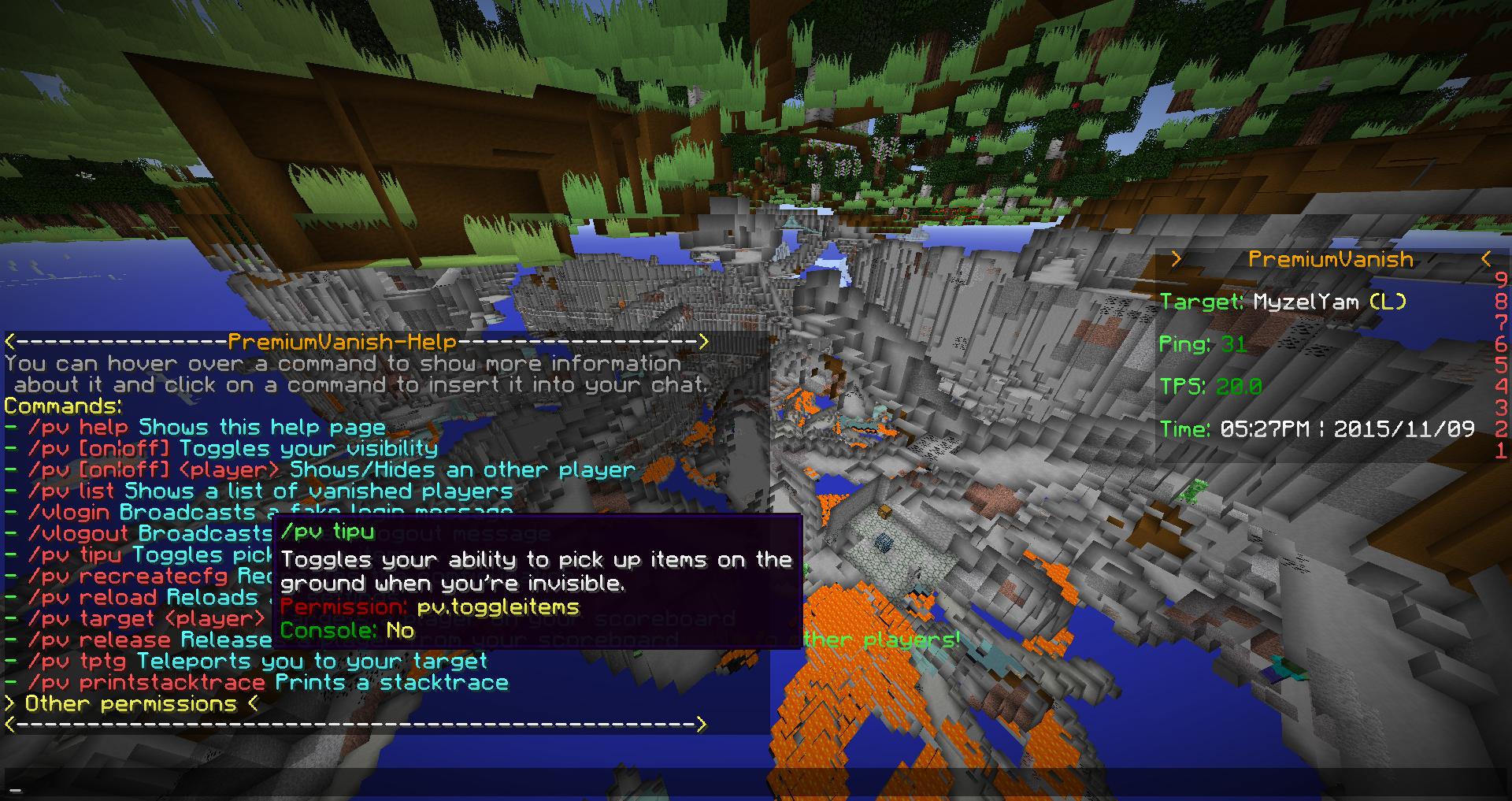
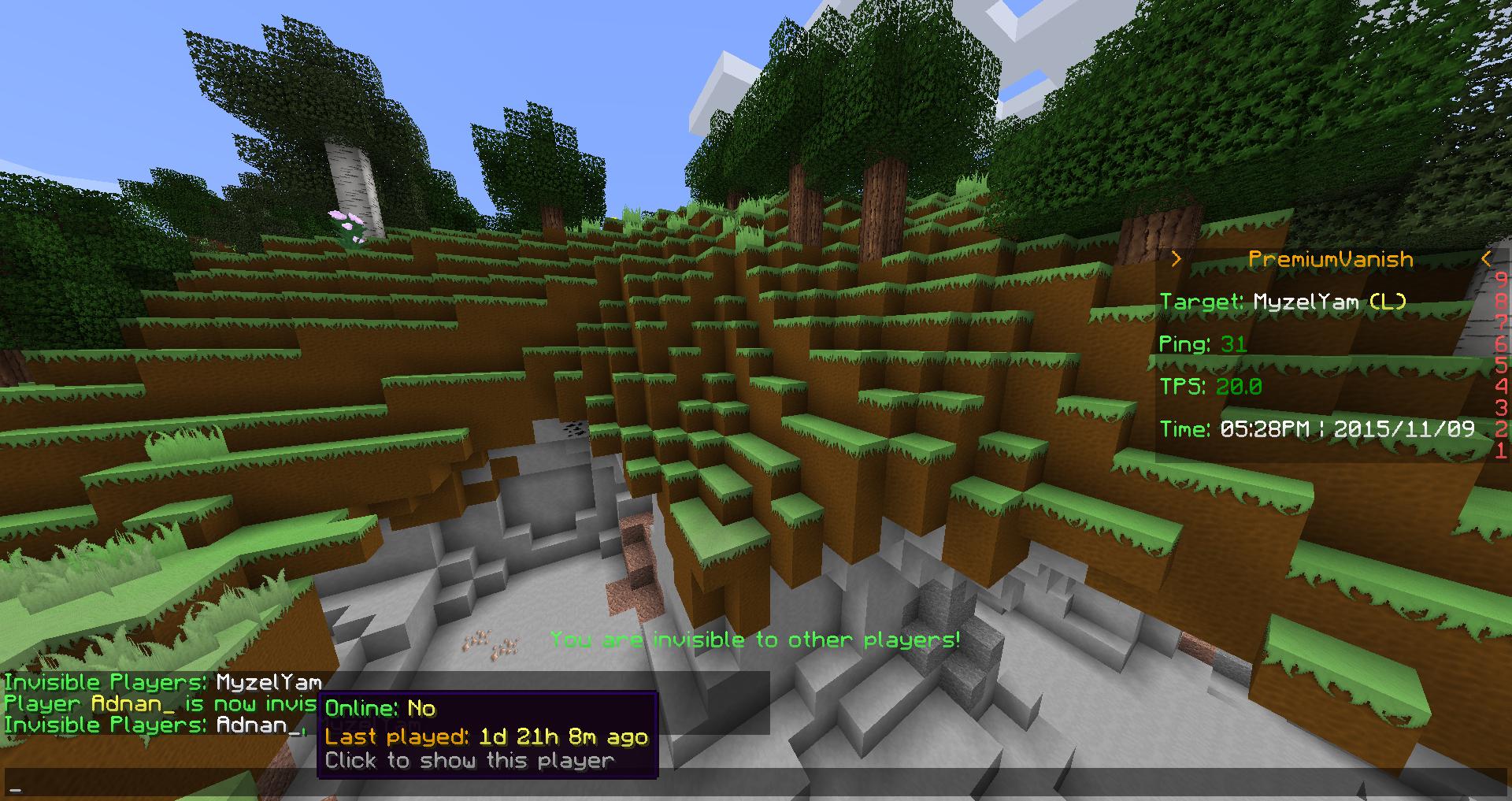
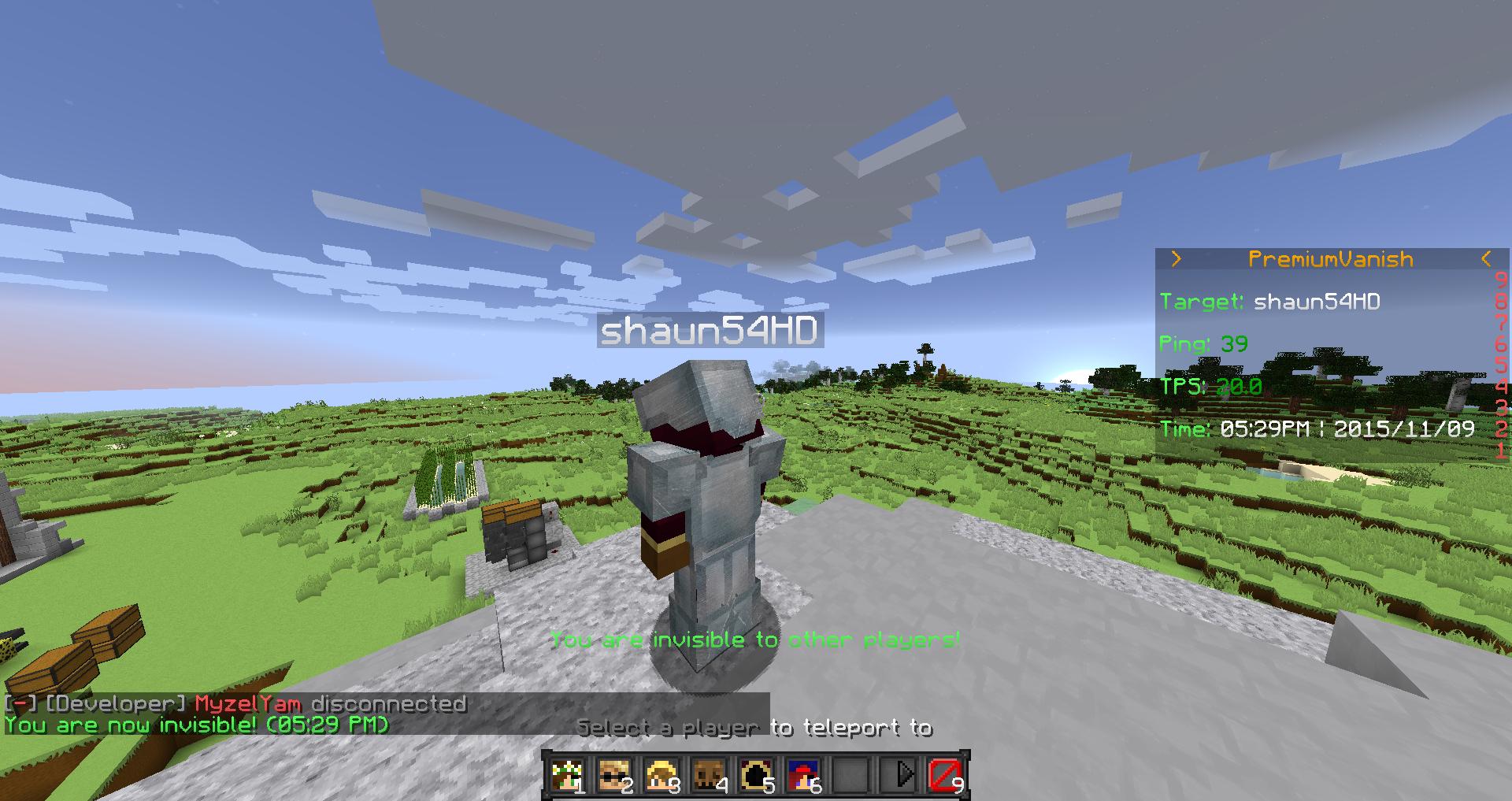
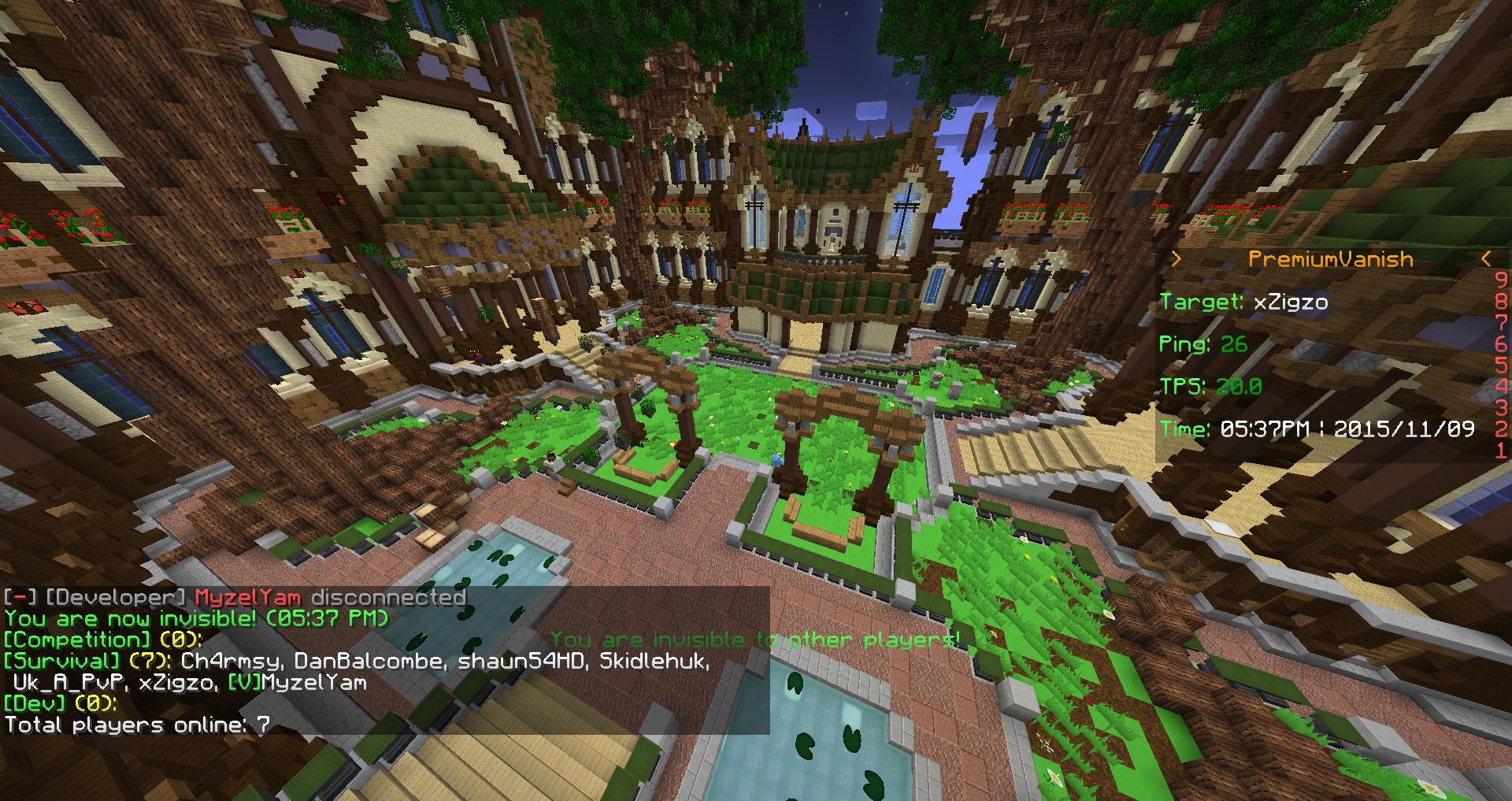

(you can get more details by doing /pv help in-game)
You can change /pv to something else in the config file if there are conflicts with other plugins

There is also a bungeecord command called /networkvanish which toggles whether you always join the bungeecord vanished (Requires PV to be installed on bungeecord).

(you can get more details by doing /pv help in-game)
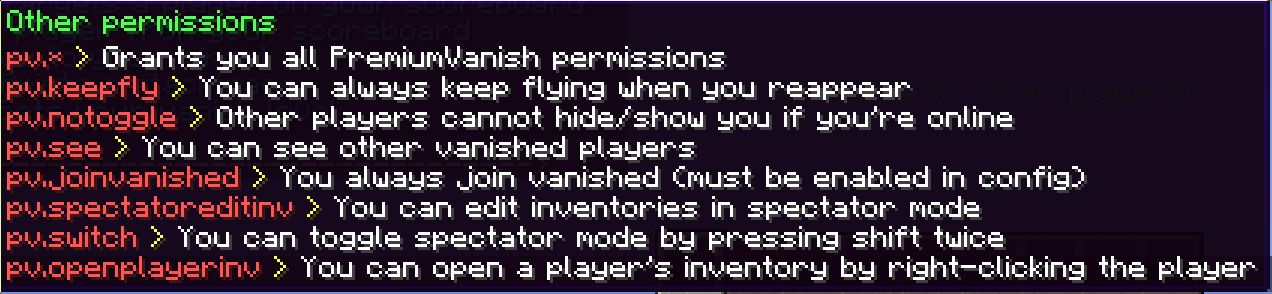
Note: the permission pv.see doesn't only work on bukkit servers but also on bungeecord, on bungeecord it allows seeing hidden players in bungeecord's commands
You can also use pv.use.levelX and pv.see.levelX if enabled in the config, higher levels override lower ones so you can specify which player can see which player more precisely. Details:
There is also the permission pv.networkvanish for the bungeecord command /networkvanish (Requires PV to be installed on bungeecord).
Other permissions can be found in the config file.

The configuration is split into messages.yml for messages and config.yml for settings. On bungeecord premiumvanish's config file is called configuration.yml.

1. Install PremiumVanish
Compatibility Notes:
Enabling database support requires a MySQL-Database. (Other SQL-based databases can work as well if you specify a direct URI, however only MySQL is officially supported and guaranteed to work)
This is also possible without using Bungeecord, simply skip the Bungeecord steps if you don't use it.
Note: If you use BungeeCord this is only possible if ip-forwarding is turned on and 'bungeecord' is set to true in spigot.yml.
If it's not working, please read what the warnings say and try to fix the problems yourself. Common issues are firewalled databases/servers, ip-forwarding not being enabled on both your bukkit servers and on the bungeecord or not using the same database for everything PV-related. If you can't seem to fix it, please send me a pm containing all the PV-related errors/warnings in your consoles / log files, the output of /pv printstacktrace and a screenshot of premiumvanish's database table in e.g. a phpmyadmin interface (if it exists).
3. Report an issue
Did something not work? First of all check this:
If you manage to find an issue, please send me a private message with the following details:
Important - install the latest ProtocolLib release as described in ProtocolLib's resource description!
With PremiumVanish you can be fully invisible and undetectable for other players while being more efficient at your administrative work
PremiumVanish is not just a regular vanish plugin.
It makes you undetectable and provides tools which help with catching rule-breakers. It's designed to be complete, secure and reliable.
It doesn't use the standard way of hiding players - it uses packet interception with ProtocolLib(which is a dependency) to prevent any information about vanished players from being sent to other players.
This is much more secure and complete than the conventional method since it acts like a firewall between the server and other players which actually checks every packet of information sent to other players and doesn't fully rely on Bukkit's hidePlayer() mechanism, which is incomplete and not fully optimized for vanish plugins (conventional method doesn't intercept ping update packets, doesn't intercept all tab-completions, etc).
To complete the illusion of you not being online, PremiumVanish can modify the outcome of other plugins' commands, provides support for Bungeecord, adds custom placeholders to lots of plugins and includes direct support for most popular plugins.
There are lots of features and tools to make catching griefers and hackers as easy and quick as possible(details below). With this plugin, you can check what 20 players are doing in less than one minute!
Most significant features:
- Fully hides players on packet level which is much more secure and cant be broken by other plugins (Hidden in the game, tablist, playercounts, serverlist, etc; It's exactly like you are not online)
- You can specify which player can see which player more precisely using layered permissions, e.g. nobody but the owner can see admins but admins can still see mods and mods can see each other; you can change your vanish level at any time with a command
- You can toggle spectator mode to glide through walls or teleport to players by simply pressing shift twice
- There is a customizable scoreboard that shows information about a target (nearest or specific player) which is highlighted using a glow effect in-game which only you can see
- Full Bungeecord support which hides invisible players in /glist, /server and /find
- PremiumVanish can be configured to modify the outcome of other plugins' commands to support its functionality (primarily to fake "Player not found" messages)
- You can limit what vanished players can do based on permissions
- You can optionally configure PV to hide players only in the tablist or only in the game
- There is a HUGE config file which can customize anything (seriously, check it out)
- Support for lots of plugins by implementing the APIs of popular vanish plugins, providing full placeholder support and hooking into most popular plugins
- Fixes flaws of Bukkit's standard methods of hiding players, which most other vanish plugins use (Modifies packet layer; adjusts tablist ping update packets and checks all tab-completions which can be abused to know who is currently on the server to be exact)
- You can customize the ability of invisible players to break blocks, place blocks, hit entities, chat, view their coordinates, modify their inventory, modify other inventories and more
- You can open a player's inventory by right-clicking the player
- You get an action bar so you always know that you're vanished
- You are still invisible after quit/restart/reload
- You can show and hide offline players and players on other servers if bungeecord support is turned on
- If desired, PremiumVanish can automatically reset your gamemode and/or teleport you back to where you vanished, depending on the world you're in
- If you are vanished, you can choose whether you can pick-up items (/pv tipu)
- You can open a player's inventory by right-clicking the player
- You can choose to always join a server or the whole network vanished
- You can choose to fly even if you're in survival/adventure mode
- You can't be targeted by mobs
- You can neither be damaged nor can you lose food bars
- You are hidden in any tab-completion (also supports bungee commands)
- You have night vision without annoying particles
- You can block neither projectiles nor the placement of blocks
- You can open and edit chests, shulker boxes and enderchests silently
- You can edit inventories even in spectator mode
- You have to confirm your chat messages so you can't accidentally chat while you're vanished
- Hides the real join/quit messages of invisible players
- Broadcasts a fake customizable join/quit message when a player vanishs or reappears which can look different for admins (You can always choose to not send this message using the -s flag in the vanish command)
- Integrated compatibility with the following plugins: Essentials, LibsDisguises, DisguiseCraft, dynmap, TrailGUI, SuperTrails, PlaceholderAPI, MVdWPlaceholderAPI, EnjinMinecraftPlugin, CustomParticleEffects, Citizens, NametagEdit, Featherboard, ServerListPlus, Party and Friends (with the author's addon); and indirect support for more plugins
- Custom placeholders for Maxim's plugins (Featherboard, Tab, AnimatedNames, etc): {premiumvanish_isvanished},
{premiumvanish_vanishedplayers},
{premiumvanish_playercount},
{premiumvanish_bungeeplayercount}, {premiumvanish_bungeeplayercount@<server>}
(same for PlaceholderAPI and ServerListPlus, but with %placeholder%)
- Detailed and nice /pv help command which is 100% customizable and makes use of 1.8 click and hover events and only shows relevant but also detailed information about commands and permissions
- Two commands to broadcast fake join/quit messages without vanishing
- A command to reload or recreate the configuration files in-game
- PremiumVanish's commands offer useful tab-completions
- A command which shows all hidden players and if they're offline it also shows you how long they've been offline for
- Commands to control the player on your scoreboard and to teleport to the player
- You can toggle your vanish scoreboard with /pv scoreboard
- You can configure command blacklists/whitelists for vanished players and execute commands when a player vanishs/reappear
- PremiumVanish offers multiple methods of hiding players
- You can prevent invisible players from cheating items in creative mode
- You can prevent invisible players from pushing other players and from being pushed (with drawbacks)
- When you reappear you don't take environmental damage for a few seconds
- You can prevent invisible players in spectator mode from teleporting using the teleport feature of the spectator mode
- You can turn nearly every feature listed above off and/or change it
- You can change nearly every message PremiumVanish sends to you
- It's possible to change PV's commands and aliases (Useful if you use a plugin like PlayerVaults which uses /pv as main command as well)
- Limited support for RedisBungee (Currently only hiding all vanished players from /glist, more support when there is more demand for it)
- And it also offers all the things I forgot in the list above
There are many differences, SV tries to stay simple while PV has all kinds of features. Also, PV helps you with doing your admin duties while providing invisibility, SV just provides invisibility. Notable PV features:
- Bungee/Database support
- PV doesnt use Bukkit's standard method of hiding players that pretty much all other vanish plugins use but it uses ProtocolLib to hide players on packet level which leads to a much more reliable and complete invisibility by cancelling packets directly (The standard method doesnt cancel all tab-completions and it doesnt cancel ping update packets which means that hacked clients can figure out whether you are online even if you are vanished with the standard method; this also prevents incompatibilities with other plugins since they cant reveil you using the standard method; this is like a second layer of protection on top of the standard one)
- A target system and a customizable scoreboard that shows you info about your target
- You can teleport to your target, choose a different one, highlight it with a glow effect that only you can see, etc
- PV can change the outcome of other plugins' commands for more compatibility with PV
- You can glide through doors and walls by pressing shift twice
- Many more options to limit what vanished players can do (hiding coordinates, preventing interaction, etc)
- You can open other players' inventories by right-clicking them
- PV's commands and messages offer hover and click effects, e.g. /pv help shows more info about a command when you hover over it and it inserts it into your chat when you click on it; /pv list shows you whether a vanished player is online or how long he has been offline for
- You can choose to have to confirm your chat messages so you can't accidentally chat while you're vanished
- You can make PV execute commands you define when vanishing/reappearing
- You can change PV's main command and aliases in the config
- There are sooo many config options in general, you can take a look at it in PV's description
(you can get more details by doing /pv help in-game)
You can change /pv to something else in the config file if there are conflicts with other plugins
There is also a bungeecord command called /networkvanish which toggles whether you always join the bungeecord vanished (Requires PV to be installed on bungeecord).
(you can get more details by doing /pv help in-game)
- /pv help - pv.help
- /pv [on|off] - pv.use
- /pv [on|off] <player> - pv.others
- /pv list - pv.list
- /pv login - pv.login
- /pv logout - pv.logout
- /pv tipu - pv.toggleitems
- /pv recreatefiles - pv.recreatefiles
- /pv reload - pv.reload
- /pv target <player> - pv.target
- /pv unlock - pv.unlock
- /pv tptg - pv.tptg
- /pv printstacktrace - pv.printstacktrace
- /pv setlevel - pv.setlevel
- /pv scoreboard - pv.togglescoreboard
Note: the permission pv.see doesn't only work on bukkit servers but also on bungeecord, on bungeecord it allows seeing hidden players in bungeecord's commands
You can also use pv.use.levelX and pv.see.levelX if enabled in the config, higher levels override lower ones so you can specify which player can see which player more precisely. Details:
- A higher or equal level of pv.see overrides a lower or equal level of pv.use; A higher level of pv.use overrides a lower level of pv.see
- Format: pv.use.level1, pv.use.level12, etc; pv.see.level1, pv.see.level43, etc
- Example: If John has pv.use.level3 and Max has pv.see.level3 then Max can see John even if John is vanished, however if John has pv.use.level4 then Max cant see him if he's vanished unless Max has pv.see.level4 or higher
- For example, you can use this feature to let nobody but the owner see admins but admins can still see mods and mods can see each other
- pv.use and pv.see without any level still work and both are level 1
- Players with pv.* and/or premiumvanish.* have access to pv.use.level1 and pv.see.level1 by default
- Opped players or players with * perm have access to pv.see.level100 and pv.use.level100 and can therefore see any player and can not be seen by any player who hasn't got pv.see.level100
- Maximum level: 100; Higher levels don't work (this is a default value, you can change this in the config)
There is also the permission pv.networkvanish for the bungeecord command /networkvanish (Requires PV to be installed on bungeecord).
Other permissions can be found in the config file.
The configuration is split into messages.yml for messages and config.yml for settings. On bungeecord premiumvanish's config file is called configuration.yml.
1. Install PremiumVanish
Compatibility Notes:
- A server running Spigot 1.8.8/1.9.X/1.10.X/1.11.X/1.12.X/1.13.X/1.14.X/1.15.X is a requirement
- A version of ProtocolLib which supports your current server version is required
- Java 8 or higher is required
- The AutoVanishOnJoin feature doesn't work if you use GroupManager for permissions
- PremiumVanish is meant to be a replacement for SuperVanish so you cannot have both installed on the same server
- Install a version of ProtocolLib which supports your current server version (see here)
- Drag & drop PremiumVanish.jar into your plugins folder
- Load PremiumVanish (Restart server or use a plugin manager)
- Adjust the config files
- Adjust your permissions (Use /pv help for a list of permissions)
- Reload it (/pv reload)
- Optional: Enable bungeecord/database support (see below)
Enabling database support requires a MySQL-Database. (Other SQL-based databases can work as well if you specify a direct URI, however only MySQL is officially supported and guaranteed to work)
This is also possible without using Bungeecord, simply skip the Bungeecord steps if you don't use it.
Note: If you use BungeeCord this is only possible if ip-forwarding is turned on and 'bungeecord' is set to true in spigot.yml.
- Install PremiumVanish on the actual bukkit servers (see above)
- Adjust the bungeecord settings in PremiumVanish's config.yml file (don't forget to set Enable to true; don't reload it yet)
- Drag & drop PremiumVanish.jar into the plugins folder of your bungeecord (Yes, it's the same .jar)
- Stop and start your bungeecord server
- Adjust the settings of PremiumVanish's configuration.yml file on your bungeecord server
- Check all the settings, make sure they're correct
- Stop your bungeecord server
- Reload PremiumVanish on your bukkit servers
- Start your bungeecord server
If it's not working, please read what the warnings say and try to fix the problems yourself. Common issues are firewalled databases/servers, ip-forwarding not being enabled on both your bukkit servers and on the bungeecord or not using the same database for everything PV-related. If you can't seem to fix it, please send me a pm containing all the PV-related errors/warnings in your consoles / log files, the output of /pv printstacktrace and a screenshot of premiumvanish's database table in e.g. a phpmyadmin interface (if it exists).
3. Report an issue
Did something not work? First of all check this:
- Look at the error, some errors tell you how to fix them
- Make sure that you're using the latest version of PremiumVanish
- Please make sure that your version of ProtocolLib supports your server version (instructions are on ProtocolLib's resource page)
- Restart your server and see if that fixes the issue
- Make sure that your config is up-to-date (/pv rccfg)
If you manage to find an issue, please send me a private message with the following details:
- If the issue is an error, please use pastebin.com to include the full error in your private message (If you are using Multicraft please copy and paste the error out of your server log file in case the error is incomplete)
- If the issue is not an error, please use /pv stacktrace and include the console output in your private message using pastebin.com
- Make sure you didn't miss step 1 or 2
- Please include an exact and really detailed explanation of what happened and what you expected to happen
- Does it work if you remove all plugins except ProtocolLib and PremiumVanish? If so, please remove the other plugins one by one on a test server to see which one causes the problem and provide its name and version. (I know that's a lot of work but it would be even more work for me and I have to provide support for other people too)
- Send me a pm with a reasonable title


