

About the Plugin
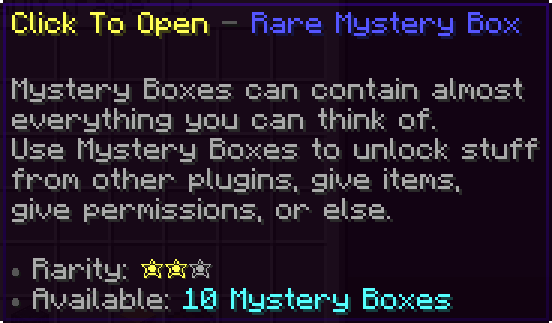
MysteryBoxes is a very high-quality crate plugin. This plugin adds Mystery Boxes to your server, which can be opened to get a random reward, such as items, permissions, etc.
Players can open and craft Mystery Boxes by visiting Mystery Vaults located anywhere on the server.
Configurable Mystery Boxes
This plugin comes with three pre-configurated Mystery Boxes. To edit a Mystery Box, go to the "/mystery-boxes" folder and edit the desired ".yml" file.
If you want to create a new Mystery Box, copy the pre-configurated Mystery Box and rename the file.
Configurable Mystery Vaults
Mystery Vaults are places where players can open Mystery Boxes, craft Mystery Boxes, view Loot History, view Statistics, and more.
Server administrators can create Mystery Vaults anywhere on the server by entering the Mystery Vault Edit Mode located in the Mystery Vault Manager menu (can be accessed via the Mystery Vault).
• The Mystery Vault doesn't have to be an Ender Chest.
• Players can enter the Mystery Vault by either clicking it or entering the "/mb menu vault" command (requires permission).
• For a list of commands, type "/mb commands".
• For a list of permissions, type "/mb permissions".
The Mystery Vault Manager
Crafting & Mystery Dust
We've added a system that prevents players from getting the same loot without any recompensation. If someone gets the same loot more than once, they will be gifted Mystery Dust.
Mystery Dust can be exchanged for Mystery Boxes in the Crafting menu (can be accessed via the Mystery Vault).
The amount of Mystery Dust that will be given to players is configurable for each individual loot.
Loot History
Whenever a player opens a Mystery Box, its loot will be saved into the Loot History. Players can view previous loots by entering the Loot History menu (can be accessed via the Mystery Vault).
Statistics
Ever wondered how many Mystery Boxes you have opened? Now you've got the answer! Simply hover your cursor over your head in any Mystery Vault located on the server.
Customize every Mystery Box opening
Configuration Debug System
Mystery Box Debug System
Configuration
This plugin is focused on giving server administrators as much variety as they want. We tried to make the configuration as much new-user-friendly as possible. If you've got any questions, feel free to send us a message or join the Cube Development's discord server.
config.yml - https://pastebin.com/JQAai2LX
language.yml - https://pastebin.com/rBnsvQuM
common-box.yml - https://pastebin.com/wbqkF5X4
rare-box.yml - https://pastebin.com/J1JJiEdH
epic-box.yml - https://pastebin.com/nZWGR3qt
Other Features
★ MySQL Database - Running a large network? If so, then this feature is for you. Players data will be sent to the online database whenever they leave the server.
★ Offline Commands - Modify players data while they are offline.
★ Console Commands - Most of the commands can be executed from the console.
★Constant Updates - Updates every Saturday/Sunday.
Requirements
PlaceholderAPI - https://www.spigotmc.org/resources/6245/
EffectLib - https://dev.bukkit.org/projects/effectlib
SpigotMC: https://www.spigotmc.org/resources/mysteryboxes-lootboxes-open-boxes-for-a-random-reward.12330/
MysteryBoxes is a very high-quality crate plugin. This plugin adds Mystery Boxes to your server, which can be opened to get a random reward, such as items, permissions, etc.
Players can open and craft Mystery Boxes by visiting Mystery Vaults located anywhere on the server.
Configurable Mystery Boxes
This plugin comes with three pre-configurated Mystery Boxes. To edit a Mystery Box, go to the "/mystery-boxes" folder and edit the desired ".yml" file.
If you want to create a new Mystery Box, copy the pre-configurated Mystery Box and rename the file.
Configurable Mystery Vaults
Mystery Vaults are places where players can open Mystery Boxes, craft Mystery Boxes, view Loot History, view Statistics, and more.
Server administrators can create Mystery Vaults anywhere on the server by entering the Mystery Vault Edit Mode located in the Mystery Vault Manager menu (can be accessed via the Mystery Vault).
• The Mystery Vault doesn't have to be an Ender Chest.
• Players can enter the Mystery Vault by either clicking it or entering the "/mb menu vault" command (requires permission).
• For a list of commands, type "/mb commands".
• For a list of permissions, type "/mb permissions".
The Mystery Vault Manager
Crafting & Mystery Dust
We've added a system that prevents players from getting the same loot without any recompensation. If someone gets the same loot more than once, they will be gifted Mystery Dust.
Mystery Dust can be exchanged for Mystery Boxes in the Crafting menu (can be accessed via the Mystery Vault).
The amount of Mystery Dust that will be given to players is configurable for each individual loot.
Loot History
Whenever a player opens a Mystery Box, its loot will be saved into the Loot History. Players can view previous loots by entering the Loot History menu (can be accessed via the Mystery Vault).
Statistics
Ever wondered how many Mystery Boxes you have opened? Now you've got the answer! Simply hover your cursor over your head in any Mystery Vault located on the server.
Customize every Mystery Box opening
Configuration Debug System
Mystery Box Debug System
Configuration
This plugin is focused on giving server administrators as much variety as they want. We tried to make the configuration as much new-user-friendly as possible. If you've got any questions, feel free to send us a message or join the Cube Development's discord server.
config.yml - https://pastebin.com/JQAai2LX
language.yml - https://pastebin.com/rBnsvQuM
common-box.yml - https://pastebin.com/wbqkF5X4
rare-box.yml - https://pastebin.com/J1JJiEdH
epic-box.yml - https://pastebin.com/nZWGR3qt
Other Features
★ MySQL Database - Running a large network? If so, then this feature is for you. Players data will be sent to the online database whenever they leave the server.
★ Offline Commands - Modify players data while they are offline.
★ Console Commands - Most of the commands can be executed from the console.
★Constant Updates - Updates every Saturday/Sunday.
Requirements
PlaceholderAPI - https://www.spigotmc.org/resources/6245/
EffectLib - https://dev.bukkit.org/projects/effectlib
SpigotMC: https://www.spigotmc.org/resources/mysteryboxes-lootboxes-open-boxes-for-a-random-reward.12330/
![Gangs+ [1.8-1.19] 2.24.2](/data/resource_icons/16/16470.jpg?1782808321)

![Combat Tag Plus [1.8 Only] [Action Bar]](/data/resource_icons/5/5222.jpg?1782790862)

![EpicWorldGenerator MODERN [1.21.11 / 26.1.2] Now with Multiverse Support! (EWG)](/data/resource_icons/0/839.jpg?1782116339)