

This plugin only works on SPIGOT based servers!
- 16.000+ Custom URL heads
- External Database with regular updates.
- Easy to use GUI with multiple tabs and pages.
- Up to 3 customisable categories which allows you to add your own heads.
- Vault, Item & PlayerPoints as currency supported
- Advanced Search Function to browse for heads.
- Picking up heads that are in the database maintain their names
- Exclusive heads for this database only!
- Suggest heads to future database updates
- Very customisable menu
- Async loading of heads to spread the lag out
- Customizable featured tags in config
- Functional API system
Adding your own heads:
If you decide to add your own heads to the local custom category, you first need the base64 code of a head. To get it, set the skin of your character to the head skin you want and use a converter like http://minecraft-heads.com/custom/heads-generator
This is the part you need:
Now you can add the head using your config:

Finally, use /hdb r to reload the plugin and the head will appear in your custom category:
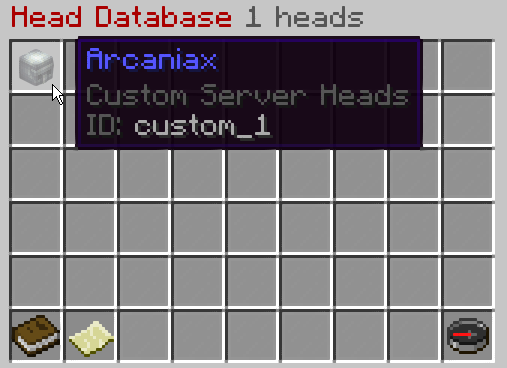
If you decide to add your own heads to the local custom category, you first need the base64 code of a head. To get it, set the skin of your character to the head skin you want and use a converter like http://minecraft-heads.com/custom/heads-generator
This is the part you need:
Now you can add the head using your config:
Finally, use /hdb r to reload the plugin and the head will appear in your custom category:
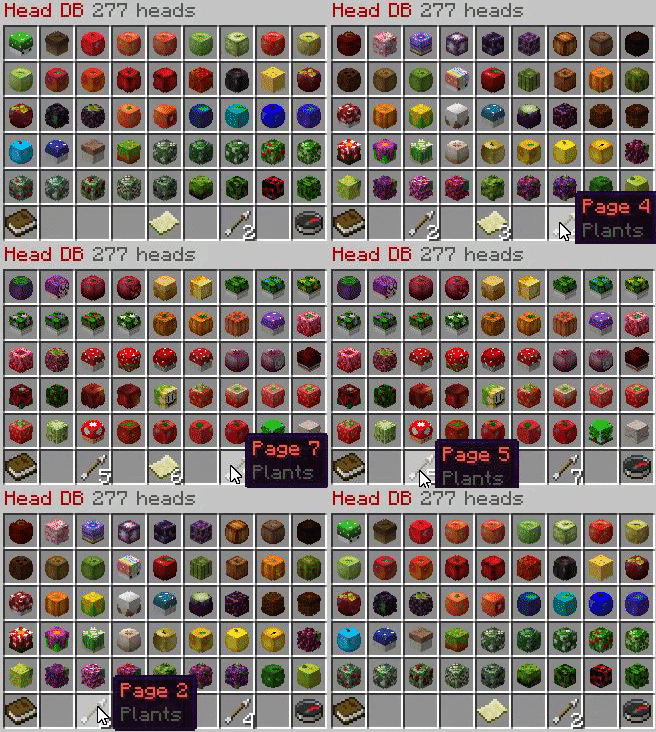
Multiple Categories
Pages
Arrow Navigation
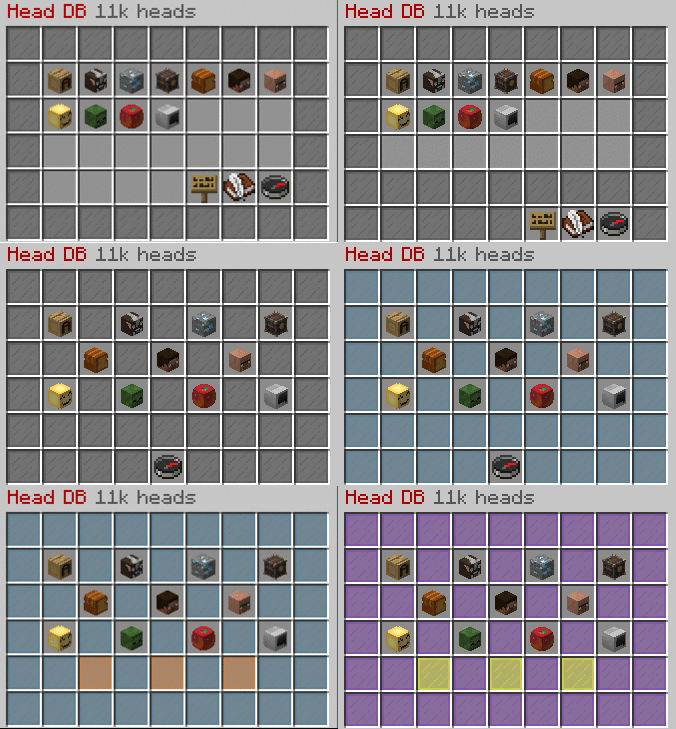
Main menu customisation
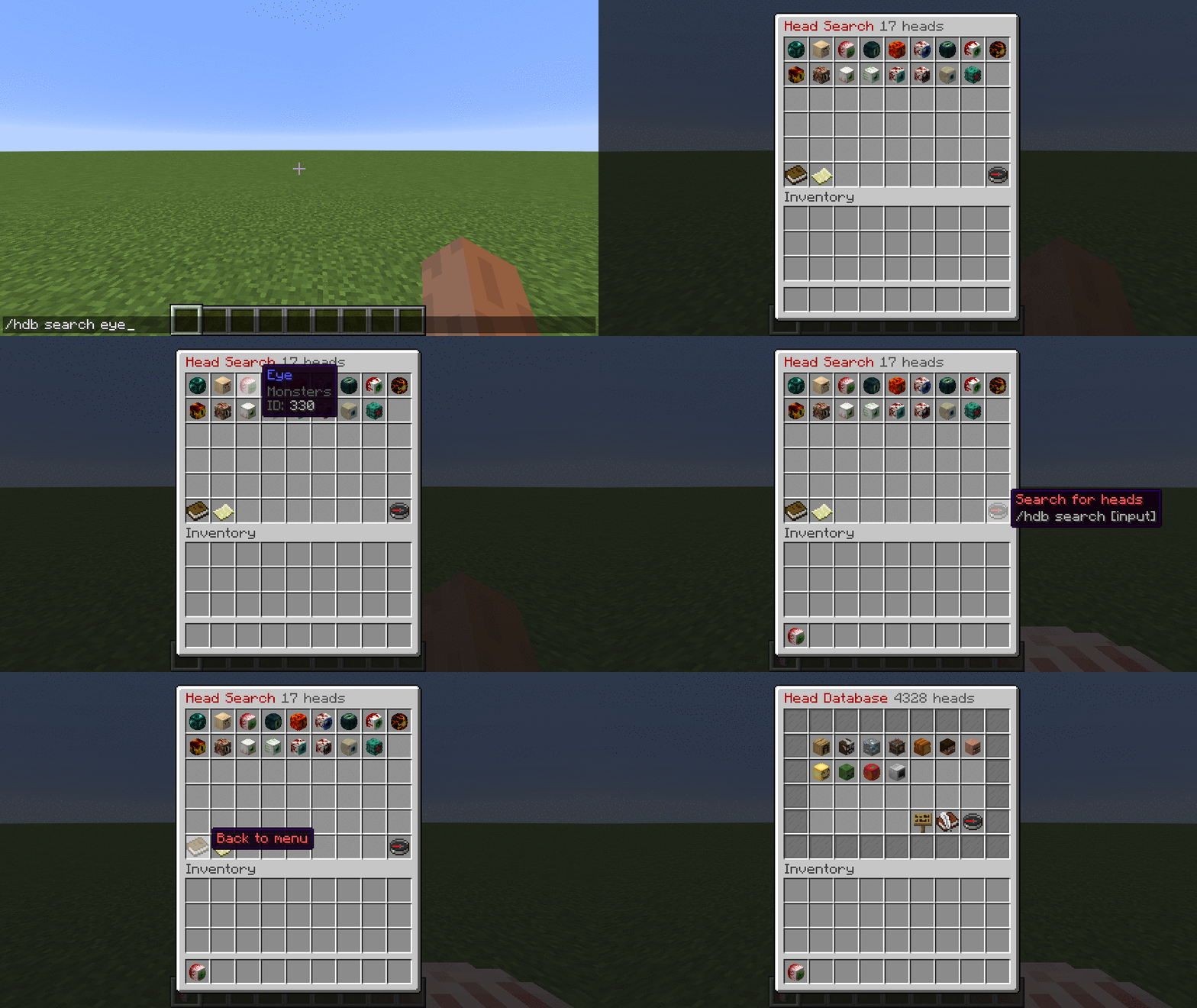
Search Function
Videos
Main menu customisation
Search Function
Videos
mc.buildersrefuge.com
/public > /plot auto > /hdb
Skyblock.xyz - Economy enabled
/hdb
Permission "headdb.open":
/headdb, /hdb, /heads: opens the user interface
/hdb info | i: Shows info about the plugin and database
/hdb search | s [input]: search for heads in the database.
Permission "headdb.phead":
/playerhead, /phead, /playerh [name]: gives you a playerhead
Permission "headdb.admin":
/hdb reload | r: reloads the entire plugin
/hdb random [player] [category] : gives a random head from the database to the player
/hdb open [player] [category/search]: opens the database for the specified player (requires renamed category name)
/hdb give | g [ID] [amount] [player]: Gives the specified player the specified amount of heads.
/hdb base64 : gives you the base64 code of the head you are holding.
headdb.allow.buy: allows the player to buy heads
headdb.category.[categoryName]: allows the player to see the heads from that category
headdb.free.[categoryName]: makes certain sections free for that player.
headdb.category.*: makes all sections visible for that player.
headdb.free.*: makes all sections free for that player.
headdb.online.hide: hides the player from the online players category
headdb.admin.showid: shows the ID's of the heads
Categories: (category names can be changed in config)
alphabet, animals, blocks, decoration, food_drinks, humans, humanoid, miscellaneous, monsters, plants, online_players, custom, custom2, custom3
headdb.category.[categoryName]: allows the player to see the heads from that category
headdb.free.[categoryName]: makes certain sections free for that player.
headdb.category.*: makes all sections visible for that player.
headdb.free.*: makes all sections free for that player.
headdb.online.hide: hides the player from the online players category
headdb.admin.showid: shows the ID's of the heads
Categories: (category names can be changed in config)
alphabet, animals, blocks, decoration, food_drinks, humans, humanoid, miscellaneous, monsters, plants, online_players, custom, custom2, custom3
/hdb info | i: Displays the creators of the plugin and the total amount of loaded heads. This includes locally saved heads in your custom section.
/hdb search | s [input]: If you use this command without an input, you will be able to search for an head by simply writing the name of it in the chat. You don't need to specify the exact name of the item.
Example: /hdb s fire will list all items that have "fire" in their name or in their tags.
/hdb give | g [ID] [amount] [player]: For this command, you need to input the ID of the head. To get the ID of the head you need to be either opped or have the permission headdb.admin.showid
Example: /hdb give 4982 10 Peter will give Peter 10 "Apple" heads.
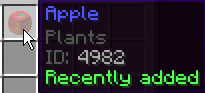
/hdb search | s [input]: If you use this command without an input, you will be able to search for an head by simply writing the name of it in the chat. You don't need to specify the exact name of the item.
Example: /hdb s fire will list all items that have "fire" in their name or in their tags.
/hdb give | g [ID] [amount] [player]: For this command, you need to input the ID of the head. To get the ID of the head you need to be either opped or have the permission headdb.admin.showid
Example: /hdb give 4982 10 Peter will give Peter 10 "Apple" heads.
Code:
#Disable some heads here
#They only will be removed on a database update or a server restart/reload
disabled-heads:
#  - "Chorus Plant"
#  - "ID:7302"
#  - "TAG:Animals"


#Disable categories here
#They only will be removed on a database update or a server restart/reload
disabled-categories:
  - ""
  - "online_players"
  - "custom2"
  - "custom3"
  - "custom4"
  - "custom5"
#  - "custom"

# change the names of the heads here
#  ID: "name here"
rename-heads:
  12105: "Iron Armour Herobrine"
#  3229: "&oBarrier Block"

# Toggle for showing the info and suggestions buttons in the main inventory
info-enabled: true
suggest-enabled: true
search-enabled: true
command-enabled: false
featured-tags-enabled: true
main-menu-category-slots: "10,11,12,13,14,15,16,19,20,21,22,23,24,25,28,29,30,31,32,33,34"
main-menu-info-slot: 41
main-menu-suggest-slot: 42
main-menu-search-slot: 43
main-menu-command-slot: 49

# Custom command to executed when clicking the command item (can be used as a back button to another menu)
custom-command: "menu"

# Featured tags
main-menu-featured-tags-slots: "37,38,39,40,41,42,43"
# [title]:[id,id...]:[search]:[startMonth-startDay]:[endMonth-endDay]
featured-tags:
  - "&eHalloween:13779,12750,13584,12581:Halloween:10-20:11-7"
  - "&bChristmas:1594,3158,2910:Christmas:11-24:12-31"
  - "&6Happy new year:4446,4447,4448:Firework:1-1:1-7"
  - "&cValentine's Day:14696,14691,14672,14687,14673:Valentine:2-1:2-21"
  - "&cHappy 4th of July:890:Firework:7-3:7-5"
  - "&fEaster:726:Easter:3-20:4-30"

# seasons
  - "&fWinter:3295,1697:Winter:10-25:12-31"
  - "&fWinter:3295,1697:Winter:1-1:3-31"

  - "&6Summer:573:summer:6-15:9-30"

# fun special days
  - "&3May the 4th be with you:14018,11622,8108,14028:Star wars:5-1:5-8"
  - "&3Pi day:13603,45,57,46:Pie:3-13:3-15"
  - "&6Pokémon Day:13797,8642,1644,2457:Pokemon:2-26:2-28"

# all year round
  - "&aRecently added:11504:recent:1-1:12-31"

# Toggle for using a arrow (only back and next) instead of the paper web based one
# Also moves the back to main menu to the middle and removes the compass
arrow-menu-nav-enabled: false
arrow-menu-search-enabled: true
arrow-menu-current-page-enabled: true
#slots (only works with arrow menu navigation)
back-to-menu-slot: 45
arrow-back-slot: 47
current-page-slot: 49
arrow-next-slot: 51
arrow-search-slot: 53
#switch search and back to main menu places
# false: left = back & right = search
#(only works with page menu navigation)
page-menu-switch-slots: false


#items (also work on the other paper navigation system)
#all the items have to be different from eachother
#
#use the 1.12 and below Material syntax (1.13 materials are not yet supported)
arrow-item: "arrow"
paper-page-item: "paper"
current-page-item: "empty_map"
back-to-menu-item: "book"
info-item: "sign"
suggest-item: "writeable_book"
search-item: "compass"
command-item: "barrier"
background-item: "stained_glass_pane:8"
background-border-item: "stained_glass_pane:7"
loading-head-item: "skull_item:3"


# Toggle for chat search, if false it will ask you to do the command instead.
use-chat-search: false

# Close inventory when you don't have enough money to buy a head
close-inventory-on-failed-purchase: false

# Close inventory when you buy a head
close-inventory-on-successful-purchase: false

# Toggle for returning lore and name to the item when picked up
return-name-on-pickup: true

# Experimental async head loading
experimental-loading: true
loadHeadAmount: 9
loadTimeDelay: 10.0

#Change the messages here, you can use & to use colors.
#buyMessage must contain %Item% and %price%
#database can contain "%count%"
messages:
   prefix: "&6HeadDB> "
   database: "&4Head DB&8 %count% heads"
   search: "&4Head Search&8 %count% heads"
   page: "Page"
   price: "&aPrice: &2"
   heads: "heads"
   head: "head"
   other: "other"
   loading: "&c..Loading.."
   recentHeads: "&aRecently added"
   noPermissionToBuyLore: "&cNo Permission"
   searchCommand: "&7/hdb search [input]"
   pheadCommand: "/phead [name]"
   loreColor: "&8"
   headItemColor: "&9"
   categoryColor: "&c&l"
   categoryLoreColor: "&e"

   noPermission: "&cYou are not allowed to do that!"
   notEnoughMoney: "&cYou don't have enough money to do this!"
   notEnoughSpace: "&cYou don't have enough space in your inventory!"
   buyMessage: "&aYou bought %item% &afor &2%price%"
   backToMenu: "&cBack to menu"
   lookingFor: "&eLooking for"
   clickToSearch: "&a&n&lClick here&b to search for heads"
   noHeadsFound: "&eNo heads found, try again!"
   moreSpecific: "&ePlease be more specific!"
   headsFound: "&eHeads found!"
   searchForHeads: "&cSearch for heads"
   pluginInfo: "&cPlugin info"
   pluginSuggest: "&cYou can suggest heads here"
   pluginSuggestLore: "&7Please check the database first!"
   chatSearch: "&bType in your search input"
   databaseStillLoading: "&cDatabase is still loading, try again in a second!"
   customCommandItemName: "&cBack to main menu"

   category-names:
      alphabet: "Alphabet"
      animals: "Animals"
      blocks: "Blocks"
      decoration: "Decoration"
      food_drinks: "Food and Drinks"
      humans: "Humans"
      humanoid: "Humanoid"
      miscellaneous: "Miscellaneous"
      monsters: "Monsters"
      plants: "Plants"
      custom: "Custom Server Heads"
      custom2: "Custom Server Heads 2"
      custom3: "Custom Server Heads 3"
      custom4: "Custom Server Heads 4"
      custom5: "Custom Server Heads 5"
      online_players: "Online Players"


#Enable Economy here
#If the price is 0 it won't show up!
Economy-Enabled: false
Economy-Currency: "$"
#Type can be "item", "currency" or "playerpoints"
Economy-Type: currency
Economy-Item: gold_ingot
#if ItemName equals "" then it accepts the item without any name
Economy-ItemName: ""

alphabet-price: 100
animals-price: 100
blocks-price: 200
decoration-price: 100
food_drinks-price: 100
humans-price: 100
humanoid-price: 100
miscellaneous-price: 100
monsters-price: 100
plants-price: 100
custom-price: 1000
custom2-price: 1000
custom3-price: 1000
custom4-price: 1000
custom5-price: 1000
online_players-price: 100
phead-price: 100

# you can set the category ID's here

alphabet-id: 164
animals-id: 335
blocks-id: 106
decoration-id: 4151
food_drinks-id: 22
humans-id: 3996
humanoid-id: 1530
miscellaneous-id: 537
monsters-id: 4187
plants-id: 11461
custom-id: 242
custom2-id: 242
custom3-id: 242
custom4-id: 242
custom5-id: 242
online_players-id: 2669

# format= name: "base64"
# do not use any ,'s in your name !
# you can use uuid:[player-uuid] to use normal players their skins
# tutorial: https://www.youtube.com/watch?v=upc4gOAQN5Y

# NOTE: If you see duplicated textures restart your client to refresh your cache
custom:
  Head Database: "eyJ0ZXh0dXJlcyI6eyJTS0lOIjp7InVybCI6Imh0dHA6Ly90ZXh0dXJlcy5taW5lY3JhZnQubmV0L3RleHR1cmUvYTZjYzQ4NmMyYmUxY2I5ZGZjYjJlNTNkZDlhM2U5YTg4M2JmYWRiMjdjYjk1NmYxODk2ZDYwMmI0MDY3In19fQ=="
  Made by: "eyJ0ZXh0dXJlcyI6eyJTS0lOIjp7InVybCI6Imh0dHA6Ly90ZXh0dXJlcy5taW5lY3JhZnQubmV0L3RleHR1cmUvNzg3Njg5ZjgzMzQzNmFhNzExYWJiZDQ1MTY4ODU2Nzc1YTJiMTE0NjU2Y2RmNGRjNWE2YzZmMWFmYWU1MjAifX19"
  Arcaniax: "uuid:4d3c1f2f71264d9b93ec01208a57188c"
  -: "eyJ0ZXh0dXJlcyI6eyJTS0lOIjp7InVybCI6Imh0dHA6Ly90ZXh0dXJlcy5taW5lY3JhZnQubmV0L3RleHR1cmUvZWQ3YWJjNDM2ODI5MzA3MGRjYjE2ZTRmN2ZlMGMyMWM3MzE3MTIxOTllYjI3MmYyZmRiN2E2ZmU2OTZjYmYzIn19fQ=="
  Hosted by: "eyJ0ZXh0dXJlcyI6eyJTS0lOIjp7InVybCI6Imh0dHA6Ly90ZXh0dXJlcy5taW5lY3JhZnQubmV0L3RleHR1cmUvZDVjNmRjMmJiZjUxYzM2Y2ZjNzcxNDU4NWE2YTU2ODNlZjJiMTRkNDdkOGZmNzE0NjU0YTg5M2Y1ZGE2MjIifX19"
  LordRazen: "uuid:8d0a41175a764b72a7dc67b555119fef"
custom2:
  §eplayer§6's head;100: "personal_head"
  Steve's skull;100: "vanilla:steve"
  Skeleton skull;200: "vanilla:skeleton"
  Wither skeleton skull;3000: "vanilla:wither_skeleton"
  Zombie head;200: "vanilla:zombie"
  Creeper head;200: "vanilla:creeper"
  Dragon head;10000: "vanilla:ender_dragon"
custom3:
  head from ID: "id:20360"
custom4:
  extra category 4: "eyJ0ZXh0dXJlcyI6eyJTS0lOIjp7InVybCI6Imh0dHA6Ly90ZXh0dXJlcy5taW5lY3JhZnQubmV0L3RleHR1cmUvYTZjYzQ4NmMyYmUxY2I5ZGZjYjJlNTNkZDlhM2U5YTg4M2JmYWRiMjdjYjk1NmYxODk2ZDYwMmI0MDY3In19fQ=="
custom5:
  extra category 5: "eyJ0ZXh0dXJlcyI6eyJTS0lOIjp7InVybCI6Imh0dHA6Ly90ZXh0dXJlcy5taW5lY3JhZnQubmV0L3RleHR1cmUvYTZjYzQ4NmMyYmUxY2I5ZGZjYjJlNTNkZDlhM2U5YTg4M2JmYWRiMjdjYjk1NmYxODk2ZDYwMmI0MDY3In19fQ=="
API download for developers
Code:
import org.bukkit.event.Listener;
import org.bukkit.plugin.java.JavaPlugin;

import me.arcaniax.hdb.api.HeadDatabaseAPI;
import me.arcaniax.hdb.api.DatabaseLoadEvent;

public class Main extends JavaPlugin  implements Listener{

   public void onEnable(){
      this.getServer().getPluginManager().registerEvents(this, this);
   }

   @EventHandler
   public void onDatabaseLoad(DatabaseLoadEvent e){
       HeadDatabaseAPI api = new HeadDatabaseAPI();
       try{
           ItemStack item = api.getItemHead("7129");
           getLogger().info( api.getItemID(item) );
       }
       catch(NullPointerException nullpointer){
          getLogger().info( "could not find the head you were looking for" );
       }
   }
}Please do not use reviews for errors or support.
If you find something that is broken,
contacting me through Discord will be a lot faster.
![Mob Farm Manager [supports 1.7.10 up to 1.17] Hopper support](/data/resource_icons/14/14237.jpg?1782806938)

![Nog's Animations [Plushify]](/data/resource_icons/1/1911.jpg?1781574194)
![EpicWorldGenerator MODERN [1.21.11 / 26.1.2] Now with Multiverse Support! (EWG)](/data/resource_icons/0/839.jpg?1782116339)
