

Tested Minecraft Versions:
jaqobb
Languages Supported:
English, Spanish, Catalan, German, French, Polish, Romanian, Turkish, Croatian, Italian, Bosnian & Russian (12 languages)
Donation Link:
https://www.paypal.me/botsentry

View attachment Bot-Sentry.svg



GET FAST SUPPORT IN OUR DISCORD SERVER

WHY BOT-SENTRY AND NOT OTHERS?

In difference with other AntiBot plugins, we achieved a 0% false-positive chance, that means that, when an attack is occurring, your real players will be able to keep joining without any issues.
In order for a real new user to play your server during a bot attack, will have to complete an easy captcha inside minecraft, and he will be able to join and play without being asked again forever!
We have an Official Public Test Server, now, you can ask yourself, why does other AntiBot plugins doesn't have a Public Test Server?
FIREWALL BANS & ATTACK MITIGATION SPEED

With Bot-Sentry, you will be able to decide if you want to ban all the bots using a powerful file system, or using system firewall banning commands (recommended). Our firewall banning commands is compatible with Linux and Windows, and you can decide what command to execute with each detected IP.
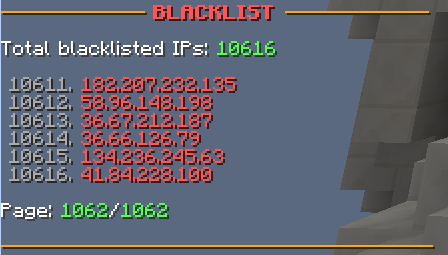
After a long research of posible checks to ban the most number of bots in a few seconds, we achieved what any AntiBot out there has never achieved. Our actual blacklisting speed is ~1000 blacklisted IPs every 5 seconds of attack. That means that, an attack that uses an average of ~5000 proxies, will be mitigated in less than a minute!
How can you activate banning thru firewall? You will need to run your server as root and change the following in the config:
If you are using Linux with distro CentOS, change the following from the config.yml:
Code (Text):
ipset-install: "yum -y install ipset"
If you are using Linux with distro Fedora, change the following from the config.yml:
Code (Text):
ipset-install: "dnf -assumeyes install ipset"
If you are using Windows, change the following from the config.yml:
Code (Text):
add-command: "cmd /c netsh advfirewall firewall add rule name=blacklist dir=in interface=any protocol=TPC localport=25565 action=block remoteip={ip}/32"
remove-command: "cmd /c netsh firewall delete rule name=blacklist remoteip={ip}/32"

CONFIGURATION & SETUP

In order to use Bot Sentry, you will need to configurate one thing of the "config.yml" file.
You will need to introduce the name of your "AuthLobbies (where the players execute /login and /register commands". You can find the name of your authlobby here. Also, must of the people just uses 1 authlobby.
Code (Text):
auth-servers:
- "AuthLobbyNameChangeMe1" # This line NEEDS to be configured
- "AuthLobbyNameChangeMe2" # Remove this line if you only have 1 auth lobby
- "AuthLobbyNameChangeMe3" # Remove this line if you don't need it
If the plugin is throwing you an error on loading, check if you run your server with "root" permissions, if you want BotSentry to ban using the Firewall, he needs root permissions.
If the plugin is throwing you an error and your server already runs with root permissions, you will need to change the following firewalling settings in the FIREWALL section on this page!
TRANSLATIONS

First of all, thanks to all this people that helped translating the plugin messages in different languages! This translations are from the version 6.0.12!
【
 】 English » messages.yml » by CyberDevelopment
【
 】 Spanish » messages.yml » by CyberDevelopment
【
 】 Catalan » messages.yml » by CyberDevelopment
【
 】 German » messages.yml » by Jens98
【
 】 French » messages.yml » by Antt0n
【
 】 Polish » messages.yml » by Starozytny
【
 】 Romanian » messages.yml » by TripleZone
【
 】 Turkish » messages.yml » by kingOf0
【
 】 Russian » messages.yml » by TAB_mk
【
 】 Croatian » messages.yml » by LudnicaKiller
【
 】 Italian » messages.yml » by BlackGamer000
【
 】 Bosnian » messages.yml » by Soild
The version 6.0.13 is not already translated, but the unique addition to it is the following code:
You have to add this code in your 6.0.12 messages.yml
Code (YAML):
# Title of the amount of the aborted connections.
aborted-connections-title: "&c&lBot&8&l-&6&lSentry"
# Sub title of the amount of the aborted connections.
aborted-connections-sub-title: "&b&l{connections} &f&laborted connections"
You can send translations into more languages joining our Discord server!
FEATURES

Suggest more features joining our Discord group!
COMMANDS & PERMISSIONS

All the commands can be ran with /bot-sentry or /b-s
Suggest more commands joining our Discord group!
API FOR DEVELOPERS

Code (Java):
» Logs-related API:
BotSentryAPI.dropAlreadyConnectedBotsLogs();
BotSentryAPI.dropConnectionSpoofBotsLogs();
BotSentryAPI.dropFastConnectionBotsLogs();
BotSentryAPI.dropGeneralLogs();
BotSentryAPI.dropSamePlayerBotsLogs();
BotSentryAPI.dropStrangePlayerBotsLogs();
BotSentryAPI.dropAllLogs();
» Whitelist-related API:
BotSentryAPI.isWhitelisted(player);
BotSentryAPI.isWhitelisted(ip);
BotSentryAPI.whitelist(ip, time);
» Blacklist-related API:
BotSentryAPI.isBlacklisted(player);
BotSentryAPI.isBlacklisted(ip);
BotSentryAPI.blacklist(player, check);
BotSentryAPI.blacklist(ip, check);
BotSentryAPI.unblacklist(ip);
BotSentryAPI.unblacklistAll();
» Anti-bot-protection-related API:
BotSentryAPI.enableAntiBot(automatic);
BotSentryAPI.disableAntiBot(automatic);
» BotSentryCheck class contains all possible checks:
CUSTOM
COMMAND
ALREADY_CONNECTED
CONNECTION_SPOOF
FAST_CONNECTION
SAME_PLAYER
STRANGE_PLAYER
If the API is well received, we will think about expanding (for example by adding custom events).
TEST THE PLUGIN

Do you want to test Bot Sentry performance before purchasing it? We have a 24hrs Test Server where you can launch Bot Attacks!
OUR WEBSITE

Thanks so much to Antt0n for creating us such an amazing website for the plugin!
https://www.botsentry.eu/
VIDEOS & SCREENSHOTS

We are glad to tell you that we have an official YouTube channel, where we will upload the tests and showcase videos of all our plugins!
SUPPORT

You can ask for support in the following ways:
DONATIONS

The following customers made an additional donation because of the Support received & the experience they had with BotSentry:
Thanks so much for appreciating our hard work to keep this mantained and updated!
SERVERS USING BOT-SENTRY

Thanks to all this servers that trust in Bot-Sentry!
You can see some of the servers using BotSentry here: https://www.botsentry.eu/#servers
REVIEWS

As a plugin author, i would like to ask you, not to use the Review section for error/bug/issues posting. You can ask support in our Discord group or in the Discussion section instead.
Also, all kind of reviews are so much appreciated by us when you try our service. So, we would like to see your feedback after using our plugin, to help improving it.
You can use the following template to review:
» How does BotSentry helped you with Bot Attacks? {your answer}
» Performance: From 0 to 10, i give this plugin a {your mark} in performance
» Design: From 0 to 10, i give this plugin a {your mark} in design
» Support: From 0 to 10, i give this plugin a {your mark} in support
» My final opinion about this plugin is {your answer}
» I would recommend this plugin because {your answer}
- 1.7
- 1.8
- 1.9
- 1.10
- 1.11
- 1.12
- 1.13
jaqobb
Languages Supported:
English, Spanish, Catalan, German, French, Polish, Romanian, Turkish, Croatian, Italian, Bosnian & Russian (12 languages)
Donation Link:
https://www.paypal.me/botsentry
View attachment Bot-Sentry.svg
GET FAST SUPPORT IN OUR DISCORD SERVER
WHY BOT-SENTRY AND NOT OTHERS?
In difference with other AntiBot plugins, we achieved a 0% false-positive chance, that means that, when an attack is occurring, your real players will be able to keep joining without any issues.
In order for a real new user to play your server during a bot attack, will have to complete an easy captcha inside minecraft, and he will be able to join and play without being asked again forever!
We have an Official Public Test Server, now, you can ask yourself, why does other AntiBot plugins doesn't have a Public Test Server?
FIREWALL BANS & ATTACK MITIGATION SPEED
With Bot-Sentry, you will be able to decide if you want to ban all the bots using a powerful file system, or using system firewall banning commands (recommended). Our firewall banning commands is compatible with Linux and Windows, and you can decide what command to execute with each detected IP.
After a long research of posible checks to ban the most number of bots in a few seconds, we achieved what any AntiBot out there has never achieved. Our actual blacklisting speed is ~1000 blacklisted IPs every 5 seconds of attack. That means that, an attack that uses an average of ~5000 proxies, will be mitigated in less than a minute!
How can you activate banning thru firewall? You will need to run your server as root and change the following in the config:
If you are using Linux with distro CentOS, change the following from the config.yml:
Code (Text):
ipset-install: "yum -y install ipset"
If you are using Linux with distro Fedora, change the following from the config.yml:
Code (Text):
ipset-install: "dnf -assumeyes install ipset"
If you are using Windows, change the following from the config.yml:
Code (Text):
add-command: "cmd /c netsh advfirewall firewall add rule name=blacklist dir=in interface=any protocol=TPC localport=25565 action=block remoteip={ip}/32"
remove-command: "cmd /c netsh firewall delete rule name=blacklist remoteip={ip}/32"
CONFIGURATION & SETUP
In order to use Bot Sentry, you will need to configurate one thing of the "config.yml" file.
You will need to introduce the name of your "AuthLobbies (where the players execute /login and /register commands". You can find the name of your authlobby here. Also, must of the people just uses 1 authlobby.
Code (Text):
auth-servers:
- "AuthLobbyNameChangeMe1" # This line NEEDS to be configured
- "AuthLobbyNameChangeMe2" # Remove this line if you only have 1 auth lobby
- "AuthLobbyNameChangeMe3" # Remove this line if you don't need it
If the plugin is throwing you an error on loading, check if you run your server with "root" permissions, if you want BotSentry to ban using the Firewall, he needs root permissions.
If the plugin is throwing you an error and your server already runs with root permissions, you will need to change the following firewalling settings in the FIREWALL section on this page!
TRANSLATIONS
First of all, thanks to all this people that helped translating the plugin messages in different languages! This translations are from the version 6.0.12!
【
【
【
【
【
【
【
【
【
【
【
【
The version 6.0.13 is not already translated, but the unique addition to it is the following code:
You have to add this code in your 6.0.12 messages.yml
Code (YAML):
# Title of the amount of the aborted connections.
aborted-connections-title: "&c&lBot&8&l-&6&lSentry"
# Sub title of the amount of the aborted connections.
aborted-connections-sub-title: "&b&l{connections} &f&laborted connections"
You can send translations into more languages joining our Discord server!
FEATURES
- Unique and exclusive checks 【✔】
- 100% configurable and translatable【✔】
- Stopping MCSpam without any issue【✔】
- Stopping DeathBot without any issue【✔】
- Stopping MineBot without any issue【✔】
- Capable of handling +10.000 bots per second with no delays【✔】
- Only new players will be asked to ping x times the server list to join in a middle of a bot attack!【✔】
- Your real players won't be banned【✔】
- Very optimized and light weigh for your Bungee【✔】
- Avoid all bots from registering【✔】
- Block 99% bots before they reach the AuthLobby【✔】
- Attack mode and automatism【✔】
- Slow attack detection【✔】
- Detailed attack logs【✔】
- Command to see a paginated list of all the Blacklisted/Whitelisted IPs from the chat【✔】
- Custom and most efficient whitelist system【✔】
- Custom and most efficient blacklist system【✔】
- Auto Blacklist Purge (every x seconds or after an attack)【✔】
- Auto Bot Sentry Logs Clearing (every x seconds or after an attack)【✔】
- On attack actionbar notifications【✔】
- Console messages managing【✔】
- Internal Bans (linux and windows compatible)【✔】
- On attack title notifications showing total aborted connections for the attack【✔】
Suggest more features joining our Discord group!
COMMANDS & PERMISSIONS
All the commands can be ran with /bot-sentry or /b-s
- /bot-sentry » See all available commands » bot-sentry.admin
- /bot-sentry on/off » Turn antibot mode to on/off manually » bot-sentry.admin
- /bot-sentry stats » See the current blacklisted and whitelisted IPs » bot-sentry.stats
- /bot-sentry list blacklist {page_number} » See all the Blacklisted IPs pagined thru the chat » bot-sentry.stats
- /bot-sentry list whitelist {page_number} » See all the Whitelisted IPs pagined thru the chat » bot-sentry.stats
- /bot-sentry notifications on/off » Activate the actionbar attack notifications » bot-sentry.notifications
- /bot-sentry blacklist {ip} » Blacklist a specified IP
- /bot-sentry un-blacklist {ip} » Unblacklist a specified IP
- /bot-sentry drop blacklist » Delete all blacklisted IPs » bot-sentry.admin
- /bot-sentry drop whitelist » Delete all whitelisted IPs » bot-sentry.admin
- /bot-sentry drop logs » Delete all the logs » bot-sentry.admin
- /bot-sentry helpme » Get the Discord group link » bot-sentry.admin
Suggest more commands joining our Discord group!
API FOR DEVELOPERS
Code (Java):
» Logs-related API:
BotSentryAPI.dropAlreadyConnectedBotsLogs();
BotSentryAPI.dropConnectionSpoofBotsLogs();
BotSentryAPI.dropFastConnectionBotsLogs();
BotSentryAPI.dropGeneralLogs();
BotSentryAPI.dropSamePlayerBotsLogs();
BotSentryAPI.dropStrangePlayerBotsLogs();
BotSentryAPI.dropAllLogs();
» Whitelist-related API:
BotSentryAPI.isWhitelisted(player);
BotSentryAPI.isWhitelisted(ip);
BotSentryAPI.whitelist(ip, time);
» Blacklist-related API:
BotSentryAPI.isBlacklisted(player);
BotSentryAPI.isBlacklisted(ip);
BotSentryAPI.blacklist(player, check);
BotSentryAPI.blacklist(ip, check);
BotSentryAPI.unblacklist(ip);
BotSentryAPI.unblacklistAll();
» Anti-bot-protection-related API:
BotSentryAPI.enableAntiBot(automatic);
BotSentryAPI.disableAntiBot(automatic);
» BotSentryCheck class contains all possible checks:
CUSTOM
COMMAND
ALREADY_CONNECTED
CONNECTION_SPOOF
FAST_CONNECTION
SAME_PLAYER
STRANGE_PLAYER
If the API is well received, we will think about expanding (for example by adding custom events).
TEST THE PLUGIN
Do you want to test Bot Sentry performance before purchasing it? We have a 24hrs Test Server where you can launch Bot Attacks!
- Test Server information:
- IP: 51.77.65.27
- Port: 25600
- Version: 1.8.0-1.13.2
- Status: Offline (will open when "Influencers" get released)
OUR WEBSITE
Thanks so much to Antt0n for creating us such an amazing website for the plugin!
https://www.botsentry.eu/
VIDEOS & SCREENSHOTS
We are glad to tell you that we have an official YouTube channel, where we will upload the tests and showcase videos of all our plugins!
SUPPORT
You can ask for support in the following ways:
- Discussion page: You can ask for support in the Discussion page. Don't ask any question in the Reviews section or i won't respond you there.
- Discord Server: Joining our Discord server is the fastest and better way to receive support (multilanguage support team)
DONATIONS
The following customers made an additional donation because of the Support received & the experience they had with BotSentry:
Thanks so much for appreciating our hard work to keep this mantained and updated!
SERVERS USING BOT-SENTRY
Thanks to all this servers that trust in Bot-Sentry!
You can see some of the servers using BotSentry here: https://www.botsentry.eu/#servers
REVIEWS
As a plugin author, i would like to ask you, not to use the Review section for error/bug/issues posting. You can ask support in our Discord group or in the Discussion section instead.
Also, all kind of reviews are so much appreciated by us when you try our service. So, we would like to see your feedback after using our plugin, to help improving it.
You can use the following template to review:
» How does BotSentry helped you with Bot Attacks? {your answer}
» Performance: From 0 to 10, i give this plugin a {your mark} in performance
» Design: From 0 to 10, i give this plugin a {your mark} in design
» Support: From 0 to 10, i give this plugin a {your mark} in support
» My final opinion about this plugin is {your answer}
» I would recommend this plugin because {your answer}
![Gangs+ [1.8-1.19] 2.24.2](/data/resource_icons/16/16470.jpg?1782808321)

![Combat Tag Plus [1.8 Only] [Action Bar]](/data/resource_icons/5/5222.jpg?1782790862)

![EpicWorldGenerator MODERN [1.21.11 / 26.1.2] Now with Multiverse Support! (EWG)](/data/resource_icons/0/839.jpg?1782116339)