

Josh's Plugins presents: Helpop GUI
Attention: Plugin is being recoded. Bug-fixes may be a little delayed. The new coded version will be worth it
Any questions or help needed for the webgui portion of this plugin. Please join my discord where we can help you. A tutorial will be out soon.
Official Help Discord:

https://discord.gg/K9zVDwt
Why Helpop GUI?
Helpop GUI seamlessly connects players with staff. The plugin has been through many iterations and was initially developed for the now-closed server - McOrigins. This feature-packed plugin offers simplicity in managing player requests. Also for managers to review the performances of staff.
What makes Helpop GUI superior to other similar plugins?
Due to Helpop GUI's simplicity and behind the scenes complexity, Helpop GUI's quality will always outsource the competitor. Helpop GUI is a server-side based plugin, but is compatible with bungee use! Due to its behind the scenes messaging capabilities. This plugin should be your choice for the player to staff support.
Sick of looking for support plugins? Well, here is your final destination.
What if there is a feature that I want to be added or changed?
I am willing to work with you to develop the perfect plugin for you. Due to my work schedule, It may take a little time, but it will get done.

- 99% of messages are configurable
- Bungee compatible.
- Coded by a server admin that has seen it all.
- Simple and efficient
- Working on this post
- WebGUI (https://joshb.pro/helpopgui) (HOSTED BY ME ONLY)


By purchasing this plugin now, you must understand the following points listed as beta testing disadvantages. After the plugin finishes its beta testing, all points listed below will be removed and optimized.
- Little customization to GUI's (You may fully customize the chat report GUI)
- MySQL Only
- Semi-Heavy MySQL Usage *Please note this plugin was used on a popular server (McOrigins) with no issues, I can safely say you will not notice lag from this plugin*

- Hacker report with punishment command suggestions (0% complete)
- Suggest on the discord!

/helpop <message> (Alias: /report)
For Players: Report suspicious activity.
For Staff: Open the GUI to view all open/handling tickets.
/chatreport <username>
For everyone: opens a GUI of categories you can report a player for.
/viewchat <ticket #>
For Staff: If the staff member is handling said chat report #, this will allow them to view the logs of the player via pastebin link.
helpopgui.staff - used to define a staff member that allows them to open the helpop GUI.
helpopgui.moderator - Allows access to the Manager Tab (Manage Ticket ID Only)
helpopgui.admin - Allows access to the Manager Tab (Manage User Settings)
helpopgui.command.helpop.rate- Allows players to rate a ticket they submitted after it has been handled.
helpopgui.command.helpop.travel - Allows staff to travel to different servers via click the server name of the ticket message.
helpopgui.search - Allows staff to search all tickets with keywords of information.
helpopgui.command.reload - Reload the plugins config files via '/helpop reload'.

GUI Folder - Where you can customize the GUIs
Messages.yml - Currently only able to customize the prefix and no perm messages.
MySQL.yml - This is where you enter the MySQL information for the plugin.
- Host-Password (These are self-explanatory)
- Connection-Timeout-Refresh - Used to prevent the connection from being timed out from MySQL. Default: 10 minutes
Settings.yml - Where you can change the general settings of the plugin.
- Server-Name - Used for titling the main GUI for staff and setting the location names for reports.
- Web-Interface - Information used to send the website the necessary information to securely develop chat logs
- Command-Cooldown - Used to set cooldown for players from using the commands listed.

- Ensure your MySQL connection is set up and a user made with full permissions.
- Upload the plugin to your server and start the server.
- Enter your MySQL information in the Settings.yml.
- Change the server name in the Settings.yml to the name of your server.
- Login to http://joshb.pro/helpopgui/ and obtain your client-id and token.
- Paste the client-id and token in your settings.yml
- Restart your server.
- The plugin is now up and running.

The main command (/helpop) with an alias of /report, is what the plugin was made for. A simple and easy to use system to allow players to quickly get a staff members attention.

Again, the plugin was on a popular server, we've seen it all. So I decided to add a simple system to deter spammers!

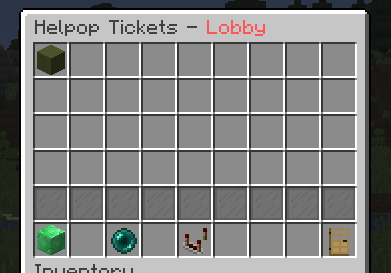
The simple to use GUI for your staff members. Start handling tickets, view all active tickets, manage tickets, get the stats of your staff members, the list goes on. Heres a look at what the main GUI looks like:
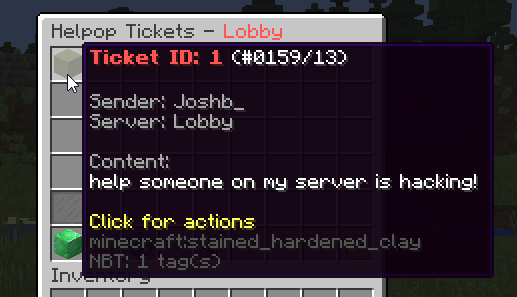
Not only do you get to claim tickets in the GUI, but you can also preview them! See what you're getting into before you decide if you think that ticket is for another staff member:
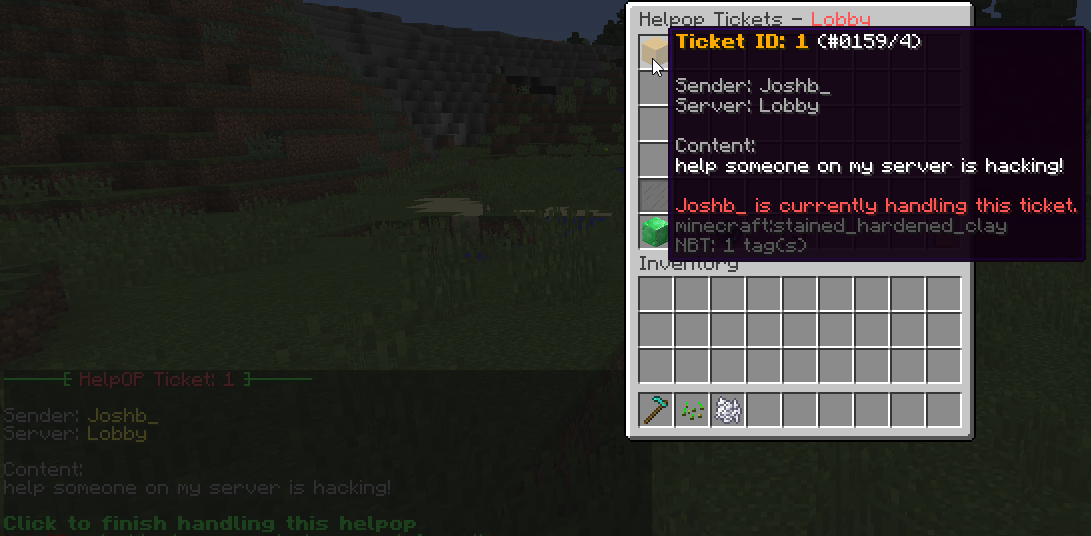
If the ticket is for you, then claim it! Either Right-Click to automatically claim it:
or left click to see the other options available to you:
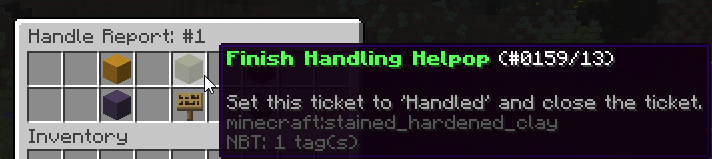
Everything about support is speed, why dont you move your mouse around and look at what you can do on the messages.



Yet again, the plugin was on a popular server, we've seen it all. So I have added the ability to give players blacklist points due to them abusing the system. (Spamming, Useless Helpops, so on...) Heres how to issue one:
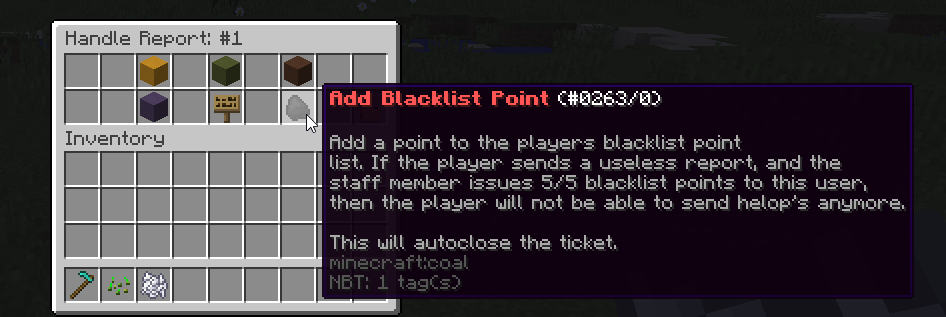
Doing so will add a blacklist point to the player, if they get 5/5 blacklist points, they will be unable to send another helpop. Simple.
Everyone changes, so if players decide to appeal on your website to be cleared of blacklist points. You can do so in the GUI! To do so, click on the Manager Button (Admin Permission)
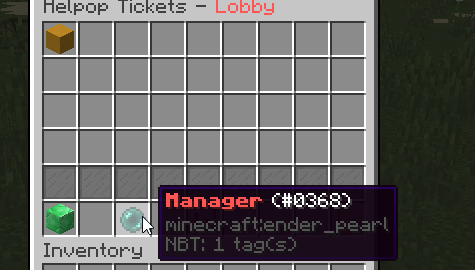
Then click on Manager Player Settings
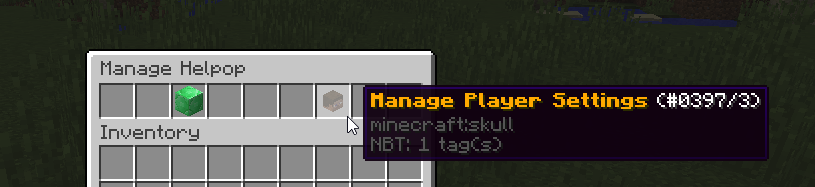
And then type out the player's username and click on the paper.
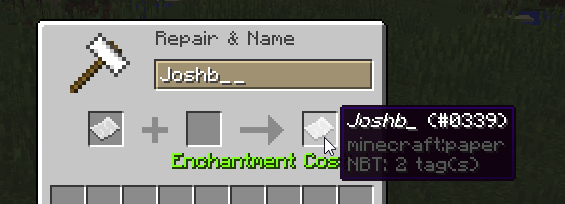
Now you will see a column for blacklist points.
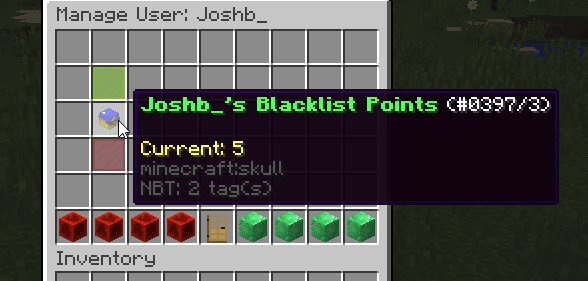
Simply click on -1 to remove a point, or click it till you remove all points. DONT FORGET TO SAVE !
!
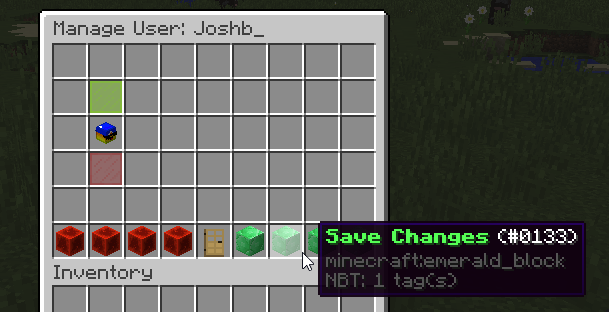
You will know you did it right when you see this message:

You can also manage the tickets! To do so, go to the manager tab again, and click on Manage Helpop Ticket ID. After you enter the ID, you will see a GUI like this!
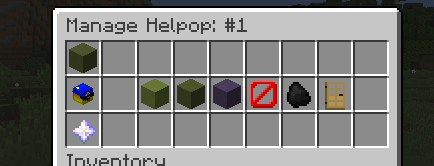
From here, you can force close tickets, see who handled the ticket, view its rating, and anything else you can possibly do with tickets.
Players may rate helpops! This is a touchy subject to cover since some will argue that players will just submit nonsense, but that is up to you to enforce! I have included the feature regardless.
After a staff member has finished handling a players helpop, the player will get this message:

Clicking on Rate this helpop will open a GUI like so:
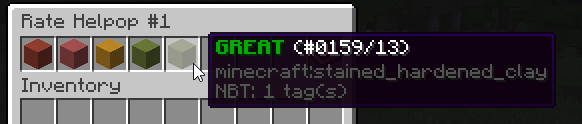
Judging on their experience with the support, they are able to rate the helpop 1-5! 5 being GREAT! After they click the rating, the will be prompted to type a passage on the rating like so:

After submitting the rating, it will be stored away in the database until you decide to pull the information on the ticket.
In the main GUI, you will see a button labeled "Stats". This is where you can see how many helpops your staff handled:
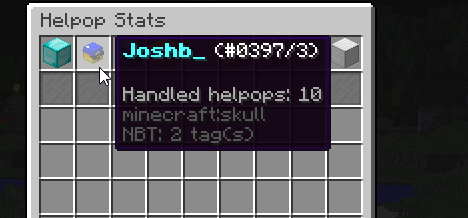
This plugin has a fully functional chat reporting feature that works with the Helpop GUI!
With a user typing "/chatreport <username>"
This will come up on the staff GUI (Ignore me being both the reporter and the offender xD):
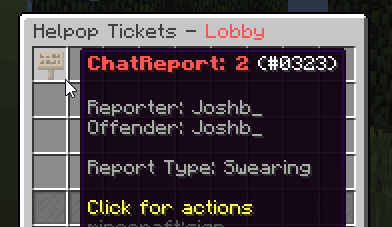
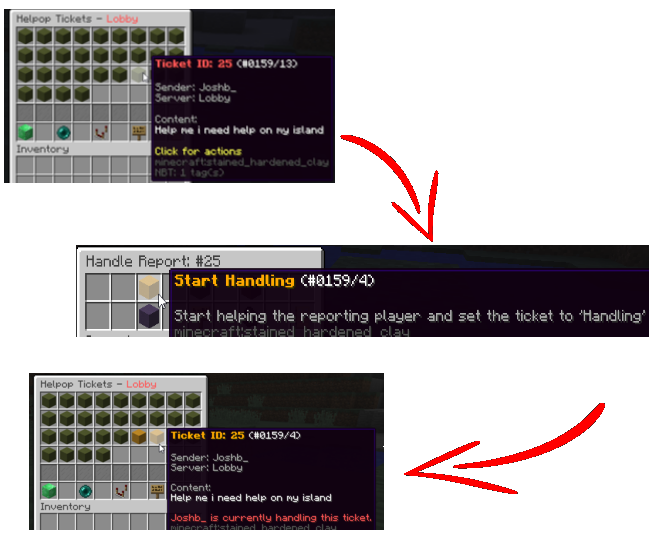
Clicking on this item will act as a regular helpop ticket with a handle ticket menu. Start handling the ticket to receive this message:
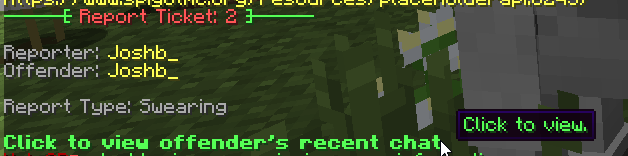
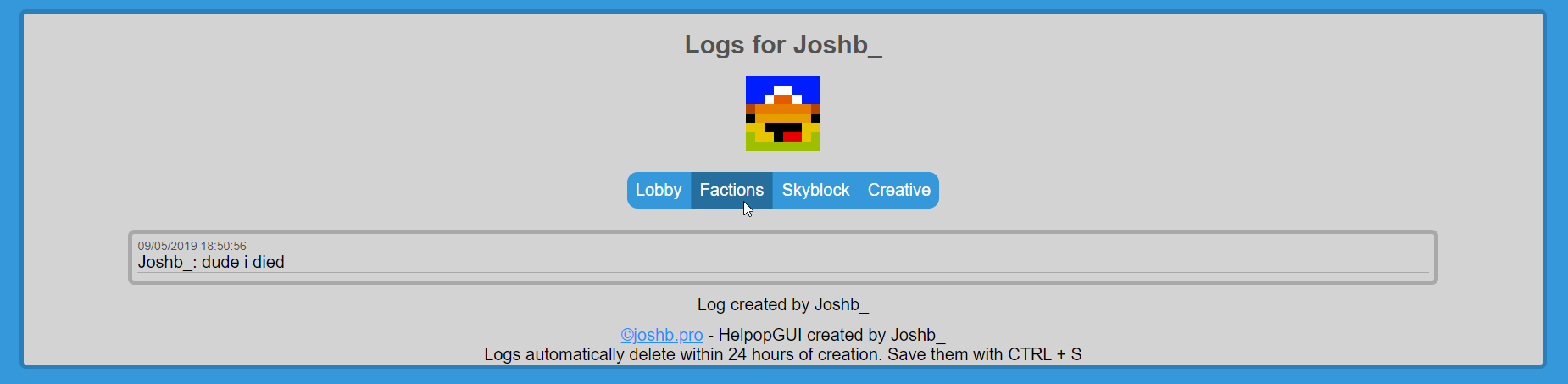
After clicking the view logs message, you will be able to click the pastebin to view the player's recent chat logs.

As so:
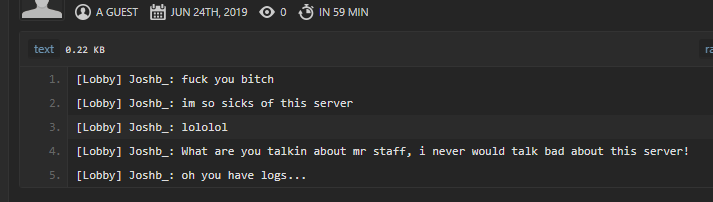
This will allow you to execute the appropriate punishment, then allow you to handle the ticket.
Attention: Plugin is being recoded. Bug-fixes may be a little delayed. The new coded version will be worth it
Any questions or help needed for the webgui portion of this plugin. Please join my discord where we can help you. A tutorial will be out soon.
Official Help Discord:
https://discord.gg/K9zVDwt
Why Helpop GUI?
Helpop GUI seamlessly connects players with staff. The plugin has been through many iterations and was initially developed for the now-closed server - McOrigins. This feature-packed plugin offers simplicity in managing player requests. Also for managers to review the performances of staff.
What makes Helpop GUI superior to other similar plugins?
Due to Helpop GUI's simplicity and behind the scenes complexity, Helpop GUI's quality will always outsource the competitor. Helpop GUI is a server-side based plugin, but is compatible with bungee use! Due to its behind the scenes messaging capabilities. This plugin should be your choice for the player to staff support.
Sick of looking for support plugins? Well, here is your final destination.
What if there is a feature that I want to be added or changed?
I am willing to work with you to develop the perfect plugin for you. Due to my work schedule, It may take a little time, but it will get done.
- 99% of messages are configurable
- Bungee compatible.
- Coded by a server admin that has seen it all.
- Simple and efficient
- Working on this post
- WebGUI (https://joshb.pro/helpopgui) (HOSTED BY ME ONLY)
By purchasing this plugin now, you must understand the following points listed as beta testing disadvantages. After the plugin finishes its beta testing, all points listed below will be removed and optimized.
- Little customization to GUI's (You may fully customize the chat report GUI)
- MySQL Only
- Semi-Heavy MySQL Usage *Please note this plugin was used on a popular server (McOrigins) with no issues, I can safely say you will not notice lag from this plugin*
- Hacker report with punishment command suggestions (0% complete)
- Suggest on the discord!
/helpop <message> (Alias: /report)
For Players: Report suspicious activity.
For Staff: Open the GUI to view all open/handling tickets.
/chatreport <username>
For everyone: opens a GUI of categories you can report a player for.
/viewchat <ticket #>
For Staff: If the staff member is handling said chat report #, this will allow them to view the logs of the player via pastebin link.
helpopgui.staff - used to define a staff member that allows them to open the helpop GUI.
helpopgui.moderator - Allows access to the Manager Tab (Manage Ticket ID Only)
helpopgui.admin - Allows access to the Manager Tab (Manage User Settings)
helpopgui.command.helpop.rate- Allows players to rate a ticket they submitted after it has been handled.
helpopgui.command.helpop.travel - Allows staff to travel to different servers via click the server name of the ticket message.
helpopgui.search - Allows staff to search all tickets with keywords of information.
helpopgui.command.reload - Reload the plugins config files via '/helpop reload'.
GUI Folder - Where you can customize the GUIs
Messages.yml - Currently only able to customize the prefix and no perm messages.
MySQL.yml - This is where you enter the MySQL information for the plugin.
- Host-Password (These are self-explanatory)
- Connection-Timeout-Refresh - Used to prevent the connection from being timed out from MySQL. Default: 10 minutes
Settings.yml - Where you can change the general settings of the plugin.
- Server-Name - Used for titling the main GUI for staff and setting the location names for reports.
- Web-Interface - Information used to send the website the necessary information to securely develop chat logs
- Command-Cooldown - Used to set cooldown for players from using the commands listed.
- Ensure your MySQL connection is set up and a user made with full permissions.
- Upload the plugin to your server and start the server.
- Enter your MySQL information in the Settings.yml.
- Change the server name in the Settings.yml to the name of your server.
- Login to http://joshb.pro/helpopgui/ and obtain your client-id and token.
- Paste the client-id and token in your settings.yml
- Restart your server.
- The plugin is now up and running.
The main command (/helpop) with an alias of /report, is what the plugin was made for. A simple and easy to use system to allow players to quickly get a staff members attention.
Again, the plugin was on a popular server, we've seen it all. So I decided to add a simple system to deter spammers!
The simple to use GUI for your staff members. Start handling tickets, view all active tickets, manage tickets, get the stats of your staff members, the list goes on. Heres a look at what the main GUI looks like:
Not only do you get to claim tickets in the GUI, but you can also preview them! See what you're getting into before you decide if you think that ticket is for another staff member:
If the ticket is for you, then claim it! Either Right-Click to automatically claim it:
or left click to see the other options available to you:
Everything about support is speed, why dont you move your mouse around and look at what you can do on the messages.
Yet again, the plugin was on a popular server, we've seen it all. So I have added the ability to give players blacklist points due to them abusing the system. (Spamming, Useless Helpops, so on...) Heres how to issue one:
Doing so will add a blacklist point to the player, if they get 5/5 blacklist points, they will be unable to send another helpop. Simple.
Everyone changes, so if players decide to appeal on your website to be cleared of blacklist points. You can do so in the GUI! To do so, click on the Manager Button (Admin Permission)
Then click on Manager Player Settings
And then type out the player's username and click on the paper.
Now you will see a column for blacklist points.
Simply click on -1 to remove a point, or click it till you remove all points. DONT FORGET TO SAVE
!You will know you did it right when you see this message:
You can also manage the tickets! To do so, go to the manager tab again, and click on Manage Helpop Ticket ID. After you enter the ID, you will see a GUI like this!
From here, you can force close tickets, see who handled the ticket, view its rating, and anything else you can possibly do with tickets.
Players may rate helpops! This is a touchy subject to cover since some will argue that players will just submit nonsense, but that is up to you to enforce! I have included the feature regardless.
After a staff member has finished handling a players helpop, the player will get this message:
Clicking on Rate this helpop will open a GUI like so:
Judging on their experience with the support, they are able to rate the helpop 1-5! 5 being GREAT! After they click the rating, the will be prompted to type a passage on the rating like so:
After submitting the rating, it will be stored away in the database until you decide to pull the information on the ticket.
In the main GUI, you will see a button labeled "Stats". This is where you can see how many helpops your staff handled:
This plugin has a fully functional chat reporting feature that works with the Helpop GUI!
With a user typing "/chatreport <username>"
This will come up on the staff GUI (Ignore me being both the reporter and the offender xD):
Clicking on this item will act as a regular helpop ticket with a handle ticket menu. Start handling the ticket to receive this message:
After clicking the view logs message, you will be able to click the pastebin to view the player's recent chat logs.
As so:
This will allow you to execute the appropriate punishment, then allow you to handle the ticket.


