

Compatible versions of Minecraft
1.8.8, 1.12.2, 1.13.2, 1.14.2, 1.14.3, 1.14.4
The same downloaded JAR can be used for ALL versions listed above!
**IMPORTANT**: GriefDefender has a hard dependency on LuckPerms since it relies heavily on permission contexts which only LP supports. If you are using another permissions plugin such as GroupManager, PEX, zPermissions etc. you will need to use LP's migrator.
Please see https://github.com/lucko/LuckPerms/wiki/Migration
Supports GriefPrevention data migration!
See https://github.com/bloodmc/GriefDefender/wiki/GriefPrevention
Supports WorldGuard data migration!
See https://github.com/bloodmc/GriefDefender/wiki/WorldGuard
Test it live @mmolitor87's server
gd.mmolitor.com:25569
Issues: https://github.com/bloodmc/GriefDefender/Issues
API: https://github.com/bloodmc/GriefDefenderAPI
Source: https://github.com/bloodmc/GriefDefender
Languages Supported
Currently, GriefDefender 1.1.0 supports en_US and fr_FR. The public release of 1.1.0 does not have fr_FR included but you will be supplied the language file on discord.
FR
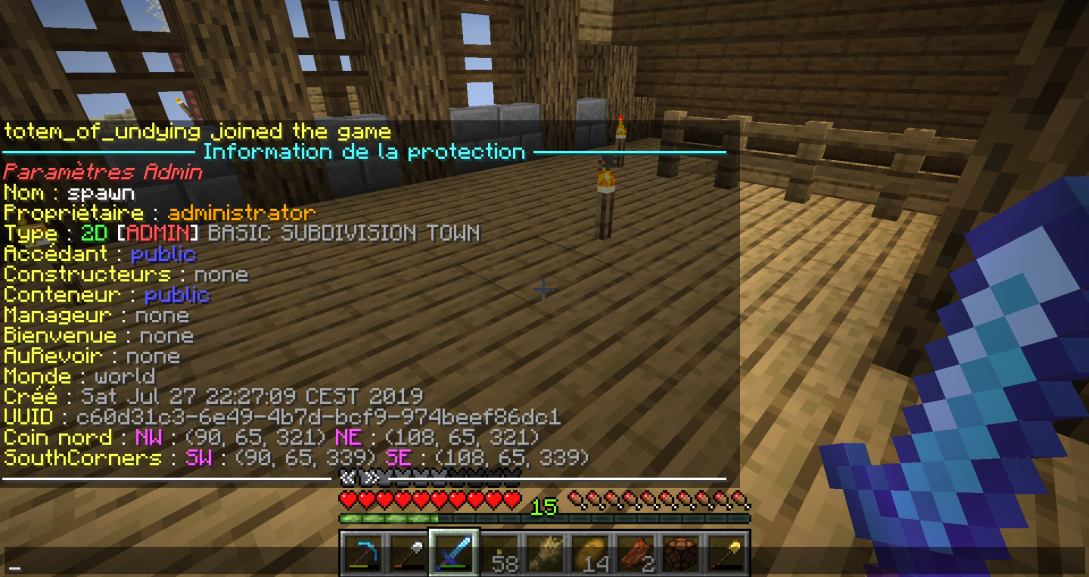
Thanks to Ark'I'Dian for the contribution!
Installation
See https://github.com/bloodmc/GriefDefender/wiki/Getting-Started
Discord Invites
After purchasing please allow up to 24 hours to receive a discord invite email. If you do NOT receive a discord invite within 24 hours of purchase, please send an email to [email protected]
Note: This email will be sent to the email used to purchase on paypal. If you require the email be sent on spigot via PM, please send me a message or email.
Support
All users that purchase GriefDefender will receive an invite to an exclusive Discord server where I will do my best to answer any questions you may have. You also will have access to development builds that will only be posted on Discord.
If you feel like supporting me to the fullest =) Become a patron
https://www.patreon.com/bloodmc
Wiki
https://github.com/bloodmc/GriefDefender/wiki
Features
mcMMO - If you are looking for the best RPG plugin that provides special abilities, skill leveling, rare loot, and more then this is your plugin.
1.8.8, 1.12.2, 1.13.2, 1.14.2, 1.14.3, 1.14.4
The same downloaded JAR can be used for ALL versions listed above!
**IMPORTANT**: GriefDefender has a hard dependency on LuckPerms since it relies heavily on permission contexts which only LP supports. If you are using another permissions plugin such as GroupManager, PEX, zPermissions etc. you will need to use LP's migrator.
Please see https://github.com/lucko/LuckPerms/wiki/Migration
Supports GriefPrevention data migration!
See https://github.com/bloodmc/GriefDefender/wiki/GriefPrevention
Supports WorldGuard data migration!
See https://github.com/bloodmc/GriefDefender/wiki/WorldGuard
Test it live @mmolitor87's server
gd.mmolitor.com:25569
Issues: https://github.com/bloodmc/GriefDefender/Issues
API: https://github.com/bloodmc/GriefDefenderAPI
Source: https://github.com/bloodmc/GriefDefender
Languages Supported
Currently, GriefDefender 1.1.0 supports en_US and fr_FR. The public release of 1.1.0 does not have fr_FR included but you will be supplied the language file on discord.
FR
Thanks to Ark'I'Dian for the contribution!
Installation
See https://github.com/bloodmc/GriefDefender/wiki/Getting-Started
Discord Invites
After purchasing please allow up to 24 hours to receive a discord invite email. If you do NOT receive a discord invite within 24 hours of purchase, please send an email to [email protected]
Note: This email will be sent to the email used to purchase on paypal. If you require the email be sent on spigot via PM, please send me a message or email.
Support
All users that purchase GriefDefender will receive an invite to an exclusive Discord server where I will do my best to answer any questions you may have. You also will have access to development builds that will only be posted on Discord.
If you feel like supporting me to the fullest =) Become a patron
https://www.patreon.com/bloodmc
Wiki
https://github.com/bloodmc/GriefDefender/wiki
Features
- Advanced permission options (meta).
https://github.com/bloodmc/GriefDefender/wiki/Advanced-Options
- Custom help command with hover text.
- Economy mode to buy/sell claims with currency.
- Extendable Platform Independent API.
https://github.com/bloodmc/GriefDefenderAPI
- Flag system powered by permission contexts to handle any protection combination you wish.
https://github.com/bloodmc/GriefDefender/wiki/Flags
- GriefPrevention Bukkit migrator.
https://github.com/bloodmc/GriefDefender/wiki/GriefPrevention
- WorldGuard migrator.
https://github.com/bloodmc/GriefDefender/wiki/WorldGuard
- HOCON configuration system that supports comments and ability to override settings per world, dimension, or globally.
Code (Text):
# unknown
# # If you need help with the configuration or have any issues related to GriefDefender,
# # create a ticket on https://github.com/bloodmc/GriefDefender/issues.
# # Note: If you have not purchased GriefDefender, please consider doing so to get
# # exclusive access to Discord for prompt support.
#
GriefDefender {
bans {
banReasons {}
}
# Controls which item/block/entity id's are blacklisted from events either on a per-flag basis or globally.
# Note: Id's support wildcards '?' and '*' by using Apache's wildcard matcher.
# The wildcard '?' represents a single character.
# The wildcard '*' represents zero or more characters.
# For more information on usage, see https://commons.apache.org/proper/c...cardMatch(java.lang.String, java.lang.String)
blacklist {
# A list of id's ignored by flags.
flag-id-blacklist {}
# A global list of source id's that are ignored by events.
# Note: This only affects events where the id specified is the source.
global-source=[]
# A global list of target id's that are ignored by events.
# Note: This only affects events where the id specified is the target.
global-target=[]
}
claim {
# Radius used (in blocks) for auto-created claim when a chest is placed. Set to -1 to disable chest claim creation.
auto-chest-claim-block-radius=4
# Whether survival claims will be automatically restored to nature when auto-deleted.
# Note: This only supports vanilla blocks. Use with caution if using custom biomes.
auto-nature-restore=false
# Whether to enable the bank/tax system for claims. Set to true to enable.
bank-tax-system=false
bank-transaction-log-limit=60
# Set claim border of specified radius (in blocks), centered on claim. If set to 1, adds an additional 1 block protected radius around claim.
# Note: It is not recommended to set this value too high as performance can degrade due to deeper claim searches.
border-block-radius=0
# Controls the max displayed claims when using the '/claimlist' command. Default: 200
claim-list-max=200
# Whether claiming is enabled or not. (0 = Disabled, 1 = Enabled)
claims-enabled=1
# The interval in minutes for cleaning up expired claims. Default: 0. Set to 0 to disable.
expiration-cleanup-interval=0
# The item used to investigate claims with a right-click.
investigation-tool="minecraft:stick"
# The item used to create/resize claims with a right click.
modification-tool="minecraft:golden_shovel"
# The specific hour in day to apply tax to all claims.
tax-apply-hour=12
}
default-global-permissions {
# The default flag settings used when an claim is created.
default-flags {
admin {
block-break=false
block-grow=true
block-modify=false
block-place=false
collide-block=false
collide-entity=false
command-execute=true
command-execute-pvp=true
enter-claim=true
entity-chunk-spawn=true
entity-damage=true
entity-riding=true
entity-spawn=true
entity-teleport-from=true
entity-teleport-to=true
exit-claim=true
explosion-block=false
explosion-entity=false
fire-spread=false
interact-block-primary=false
interact-block-secondary=false
interact-entity-primary=false
interact-entity-secondary=true
interact-inventory=false
interact-inventory-click=true
interact-item-primary=true
interact-item-secondary=true
item-drop=true
item-pickup=true
item-spawn=false
item-use=true
leaf-decay=true
liquid-flow=false
portal-use=true
projectile-impact-block=false
projectile-impact-entity=false
}
basic {
block-break=false
block-grow=true
block-modify=false
block-place=false
collide-block=false
collide-entity=false
command-execute=true
command-execute-pvp=true
enter-claim=true
entity-chunk-spawn=true
entity-damage=true
entity-riding=true
entity-spawn=true
entity-teleport-from=true
entity-teleport-to=true
exit-claim=true
explosion-block=false
explosion-entity=false
fire-spread=false
interact-block-primary=false
interact-block-secondary=false
interact-entity-primary=false
interact-entity-secondary=true
interact-inventory=false
interact-inventory-click=true
interact-item-primary=true
interact-item-secondary=true
item-drop=true
item-pickup=true
item-spawn=false
item-use=true
leaf-decay=true
liquid-flow=false
portal-use=true
projectile-impact-block=false
projectile-impact-entity=false
}
subdivision {
block-break=true
block-grow=true
block-modify=true
block-place=true
collide-block=true
collide-entity=true
command-execute=true
command-execute-pvp=true
enter-claim=true
entity-chunk-spawn=true
entity-damage=true
entity-riding=true
entity-spawn=true
entity-teleport-from=true
entity-teleport-to=true
exit-claim=true
explosion-block=true
explosion-entity=true
fire-spread=true
interact-block-primary=true
interact-block-secondary=true
interact-entity-primary=true
interact-entity-secondary=true
interact-inventory=true
interact-inventory-click=true
interact-item-primary=true
interact-item-secondary=true
item-drop=true
item-pickup=true
item-spawn=true
item-use=true
leaf-decay=true
liquid-flow=true
portal-use=true
projectile-impact-block=true
projectile-impact-entity=true
}
town {
block-break=false
block-grow=true
block-modify=false
block-place=false
collide-block=false
collide-entity=false
command-execute=true
command-execute-pvp=true
enter-claim=true
entity-chunk-spawn=true
entity-damage=true
entity-riding=true
entity-spawn=true
entity-teleport-from=true
entity-teleport-to=true
exit-claim=true
explosion-block=false
explosion-entity=false
fire-spread=false
interact-block-primary=false
interact-block-secondary=false
interact-entity-primary=false
interact-entity-secondary=true
interact-inventory=false
interact-inventory-click=true
interact-item-primary=true
interact-item-secondary=true
item-drop=true
item-pickup=true
item-spawn=false
item-use=true
leaf-decay=true
liquid-flow=false
portal-use=true
projectile-impact-block=false
projectile-impact-entity=false
}
wilderness {
block-break=true
block-grow=true
block-modify=true
block-place=true
collide-block=true
collide-entity=true
command-execute=true
command-execute-pvp=true
enter-claim=true
entity-chunk-spawn=true
entity-damage=true
entity-riding=true
entity-spawn=true
entity-teleport-from=true
entity-teleport-to=true
exit-claim=true
explosion-block=true
explosion-entity=true
fire-spread=false
interact-block-primary=true
interact-block-secondary=true
interact-entity-primary=true
interact-entity-secondary=true
interact-inventory=true
interact-inventory-click=true
interact-item-primary=true
interact-item-secondary=true
item-drop=true
item-pickup=true
item-spawn=true
item-use=true
leaf-decay=true
liquid-flow=true
portal-use=true
projectile-impact-block=true
projectile-impact-entity=true
}
}
# The default options applied to users for basic claims.
# Note: These options override default global options.
default-user-basic-options {
max-size-x="0"
max-size-y="256"
max-size-z="0"
min-size-x="5"
min-size-y="5"
min-size-z="5"
}
# The default user options for all players.
# Note: Setting default claim type options will override this.
default-user-options {
abandon-return-ratio="1.0"
blocks-accrued-per-hour="120"
chest-expiration="7"
create-limit="0"
create-mode="0"
economy-block-cost="0.0"
economy-block-sell-return="0.0"
expiration="14"
initial-blocks="120"
max-accrued-blocks="80000"
max-level="255"
min-level="0"
tax-expiration="7"
tax-expiration-days-keep="7"
tax-rate="1.0"
}
# The default options applied to users for subdivisions.
# Note: These options override default global options.
default-user-subdivision-options {
max-size-x="1000"
max-size-y="256"
max-size-z="1000"
min-size-x="1"
min-size-y="1"
min-size-z="1"
}
# The default options applied to users for towns.
# Note: These options override default global options.
default-user-town-options {
create-limit="1"
max-level="255"
max-size-x="0"
max-size-y="256"
max-size-z="0"
min-level="0"
min-size-x="32"
min-size-y="32"
min-size-z="32"
tax-expiration="7"
tax-expiration-days-keep="7"
tax-rate="1.0"
}
}
economy {
# Uses economy instead of player claim blocks.
# If false, disables the claim block system in favor of economy.
economy-mode=false
# Claim blocks earned will be converted to economy based on 'claim-block-cost'.
# (Default: false).
# Note: This setting can only be used if 'economy-mode' is true.
use-claim-block-task=false
}
general {
# The max claim inspection block distance. (Default: 100)
max-claim-inspection-distance=100
}
message {
# Set the locale to use for GD messages. (Default: en_US)
# Available languages: en_US, de_DE, ru_RU, zh_CN. The data is stored under assets in jar.
# Note: The language code must be lowercase and the country code must be uppercase.
locale="en_US"
# Whether GD prefix should be shown in greeting/farewell claim messages. (Default: true)
show-gd-prefix-greeting-farewell=true
}
# List of migrators that convert old or other protection data into the current GD claim data format.
# Note: It is recommended to backup data before using.
migrator {
# Set to true to enable the classic migrator.
# Note: Migrates GP bukkit classic claim data to current format.
# Note: It is recommended to backup data before using.
classic=false
# Set to true to enable WorldGuard data migrator.
# Note: Only cuboid regions are supported.
# Note: It is recommended to backup data before using.
worldguard=false
}
modules {
# Controls which protection modules are enabled.
# Note: If you want full protection, it is recommended to keep everything enabled.
protection {
block-break=true
block-grow=true
block-modify=true
block-place=true
collide-block=true
collide-entity=true
command-execute=true
command-execute-pvp=true
enter-claim=true
entity-chunk-spawn=true
entity-damage=true
entity-riding=true
entity-spawn=true
entity-teleport-from=true
entity-teleport-to=true
exit-claim=true
explosion-block=true
explosion-entity=true
fire-spread=true
interact-block-primary=true
interact-block-secondary=true
interact-entity-primary=true
interact-entity-secondary=true
interact-inventory=true
interact-inventory-click=true
interact-item-primary=true
interact-item-secondary=true
item-drop=true
item-pickup=true
item-spawn=true
item-use=true
leaf-decay=true
liquid-flow=true
portal-use=true
projectile-impact-block=true
projectile-impact-entity=true
}
}
options {
# A list of options standard users can manage in their towns with the /co commands.
user-town-options=[
abandon-return-ratio,
blocks-accrued-per-hour,
expiration,
create-limit,
expiration,
initial-blocks,
max-accrued-blocks,
max-level,
max-size-x,
max-size-y,
max-size-z,
min-level,
min-size-x,
min-size-y,
min-size-z,
tax-expiration,
tax-expiration-days-keep,
tax-rate
]
}
playerdata {
# Determines which claim block system to use for claims. (Default: AREA)
# If set to VOLUME, claim blocks will use the chunk count system to balance 3d claiming.
# If set to AREA, the standard 2d block count system will be used.
claim-block-system=AREA
# The rate to divide each accrued claim blocks total by.
# Set to a value greater than -1 to enable. (Default: 256).
# Note: This should only be used when migrating from volume (3D system) to area (2D system).
# In this system, a chunk costs 256 blocks.
# This requires 'claim-block-system' to be set to AREA.
migrate-area-rate=-1
# The rate to multiply each accrued claim blocks total by.
# Set to a value greater than -1 to enable. (Default: 256).
# Note: This should only be used when migrating from area (2D system) to volume (3D system).
# Each chunk is worth 65,536 blocks in the new system compared to 256 in old.
# This requires 'claim-block-system' to be set to VOLUME.
migrate-volume-rate=-1
# If enabled, resets all playerdata accrued claim blocks to match total cost of claims owned.
# Example: If a player has 5 basic claims with a total cost of 1000, this will set their accrued claim blocks to 1000.
# Note: This will also reset all bonus claim blocks to 0. It is highly recommended to backup before using.
reset-accrued-claim-blocks=false
# If enabled, resets all playerdata migration flags to allow for another migration.
# Note: Use this with caution as it can easily mess up claim block data. It is highly recommended to backup before using.
reset-migrations=false
# Whether player data should be stored globally. False will store all data per world.
use-global-storage=true
}
thread {
# The number of threads to use for GD's executor. (Default: 1)
executor-threads=1
}
town {
# Whether survival towns will be automatically restored to nature when auto-deleted.
auto-nature-restore=false
# The interval in minutes for restoring blocks in an expired town. Set to 0 to disable. Note: This only supports vanilla blocks. Use with caution if using custom biomes.
cleanup-task-interval=5
# The required amount of funds to create a town. (Default: 0)
# Note: This requires an Economy plugin.
creation-cost=0.0
}
visual {
# The visual accent block used for admin claims. (Default: minecraft umpkin)
admin-accent-block="minecraftumpkin"
# The visual corner block used for admin claims. (Default: minecraft:glowstone)
admin-corner-block="minecraft:glowstone"
# The visual filler block used for admin claims. (Default: minecraftumpkin)
admin-filler-block="minecraftumpkin"
# The visual accent block used for basic claims. (Default: minecraft:gold_block)
basic-accent-block="minecraft:gold_block"
# The visual corner block used for basic claims. (Default: minecraft:glowstone)
basic-corner-block="minecraft:glowstone"
# The visual filler block used for basic claims. (Default: minecraft:gold_block)
basic-filler-block="minecraft:gold_block"
# The visual block used during claim creation. (Default: minecraft:diamond_block)
claim-create-block="minecraft:diamond_block"
# The visual accent block used to visualize an error in a claim. (Default: minecraft:netherrack)
error-accent-block="minecraft:netherrack"
# The visual corner block used to visualize an error in a claim. (Default: minecraft:redstone_ore)
error-corner-block="minecraft:redstone_ore"
# The visual filler block used to visualize an error in a claim. (Default: minecraft:diamond_block)
error-filler-block="minecraft:diamond_block"
# Whether to hide the glowstone/gold block borders when using WECUI.
hide-borders-when-using-wecui=false
# Whether drag visuals should be shown while creating a claim in 2D mode.
hide-wecui-drag-visuals-2d=true
# The visual accent block used while in restore nature mode. (Default: minecraft:diamond_block)
nature-accent-block="minecraft:diamond_block"
# The visual corner block used while in restore nature mode. (Default: minecraft:diamond_block)
nature-corner-block="minecraft:diamond_block"
# The visual accent block used for subdivision claims. (Default: minecraft:white_wool or minecraft:wool for legacy versions)
subdivision-accent-block="minecraft:white_wool"
# The visual corner block used for subdivision claims. (Default: minecraft:iron_block)
subdivision-corner-block="minecraft:iron_block"
# The visual filler block used for subdivision claims. (Default: minecraft:white_wool or minecraft:wool for legacy versions)
subdivision-filler-block="minecraft:white_wool"
# The visual accent block used for town claims. (Default: minecraft:emerald_block)
town-accent-block="minecraft:emerald_block"
# The visual corner block used for town claims. (Default: minecraft:glowstone)
town-corner-block="minecraft:glowstone"
# The visual filler block used for town claims. (Default: minecraft:emerald_block)
town-filler-block="minecraft:emerald_block"
}
}
- Inherit system that allows parent claims to enforce protection to children.
- Schematics for admins to backup/restore claims. (Useful for events. Note: Requires WorldEdit)
- WECUI support for improved client-side visuals.
https://github.com/bloodmc/GriefDefender/wiki/WECUI-(Improved-Visuals)
- Tracking system for improved protection.
- ACF Commands with command completion support!
- Interactive chat UI for managing claims and flags.
- Redstone protection. (Note: May not work fully in 1.8.8)
- Restore claims back to world gen state. (Currently WIP for 1.14.X, available in all other versions)
- WorldGuard support.
mcMMO - If you are looking for the best RPG plugin that provides special abilities, skill leveling, rare loot, and more then this is your plugin.


